Method A: Agency Management Fee Refund from General Account
This method involves physically transferring funds from the agency’s general bank account to the trust account and receipting them in Cirrus8.
Step 1: Transfer Funds to Trust Account
- Transfer the management fee refund amount from the agency general account to the trust account.
Step 2: Receipt Funds in Cirrus8 as a Supplier Refund
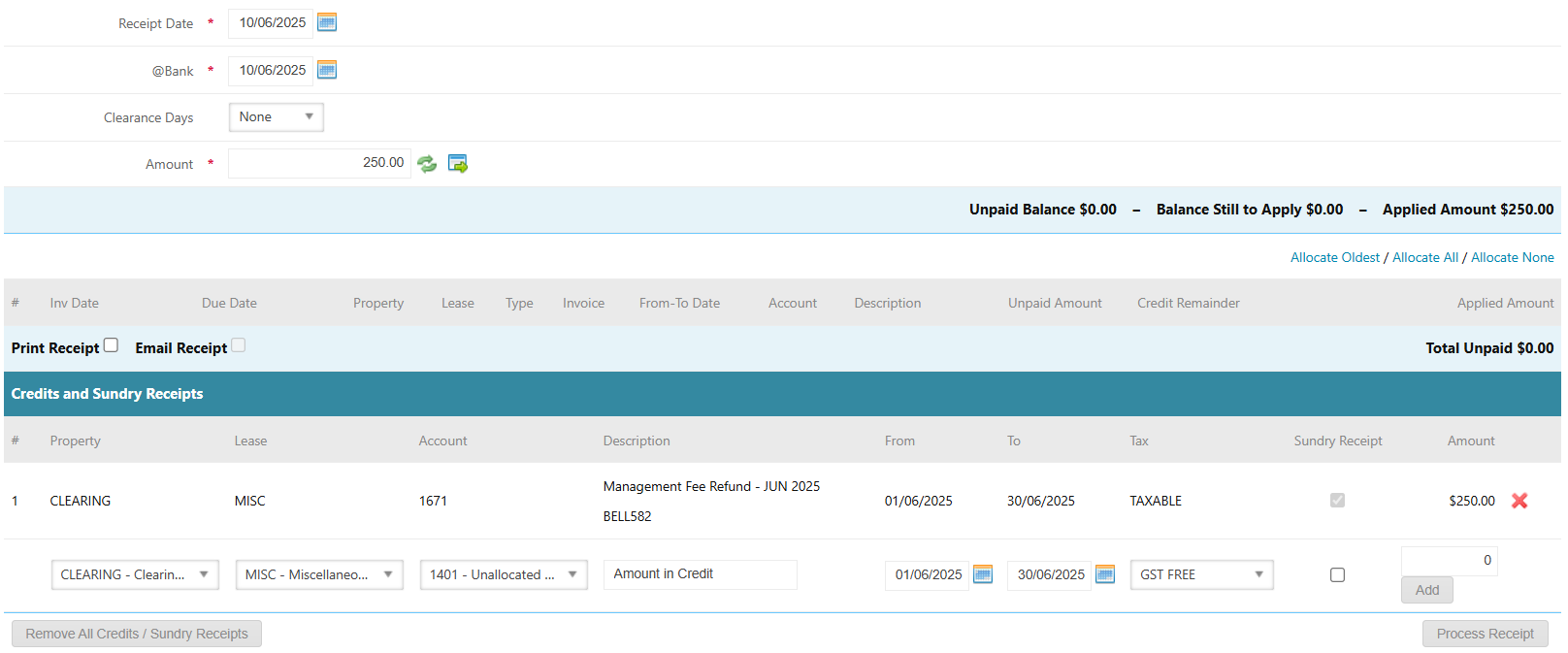
- Navigate to Accounts Receivable > Receipts
- Select Method as Property: Select Clearing Property from the drop-down menu
- Lease/Debtor: Select MISC
- Direct Deposit Name, Receipt Date, @Bank Date, Amount: Enter these details as per the trust bank statement
- Click Add Credit / Sundry Receipts
- Account Code: Select the Income Management Fee Code equivalent to the original Management Fee Expense Code
- Description: Enter the relevant description as required e.g. Management Fee Refund - JUN 2025 [Property]
- From Date and To Date: Enter the period the management fee refund applies to
- Tick Sundry Receipt
- Tax Rate: Same as original expense
- Enter the refund amount in the Amount field
- Click Add
- Click Process Receipt
Step 3: Journal Funds from Clearing Property to Target Property
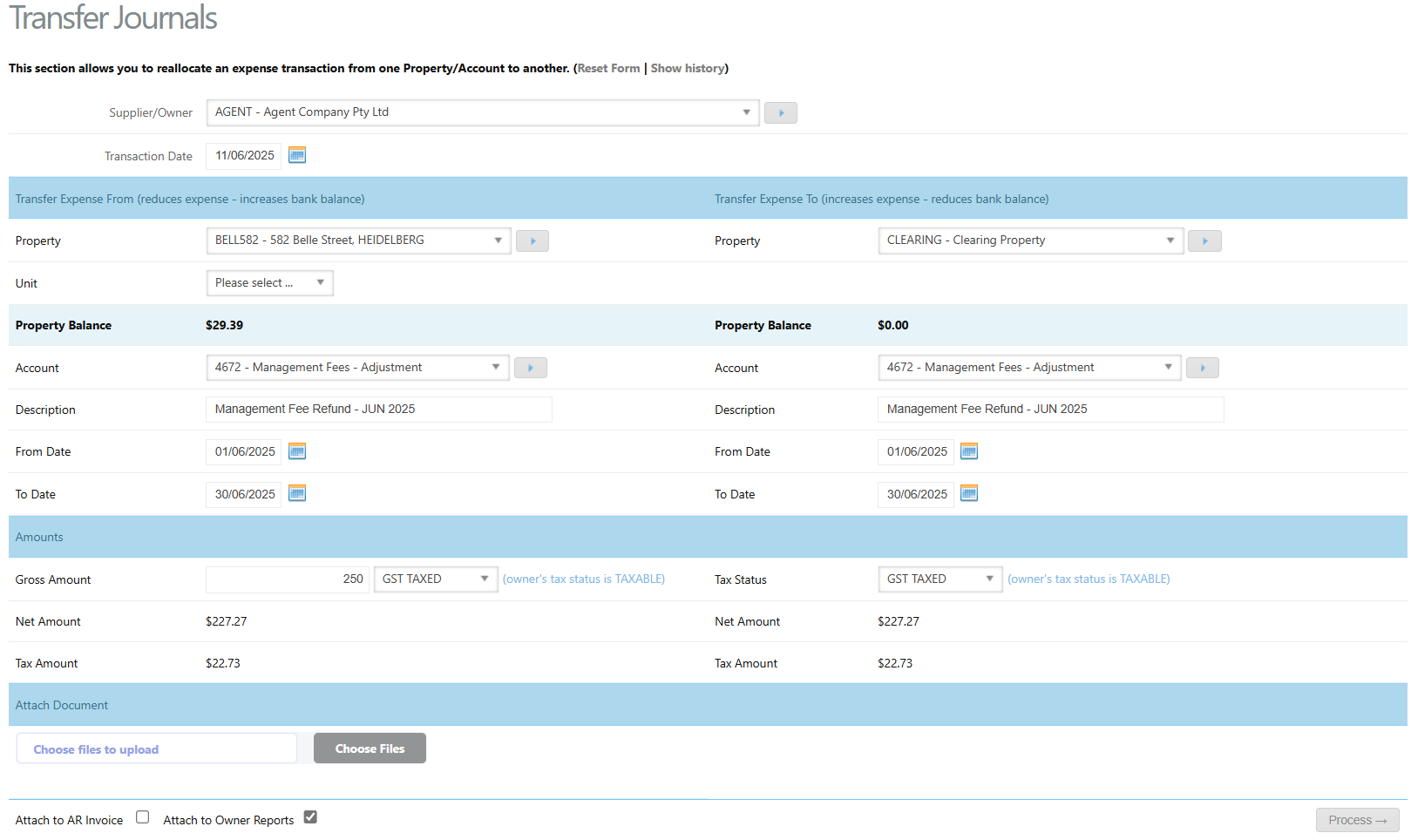
Always use the Management Fee - Adjustment account code- Go to Accounts Payable > Transfer Journals
- Supplier: Select your agency company
- Transaction Date: Date funds were received as per the bank statement
Transfer Expense From:
- Property: Property entitled to refund
- Account: Management Fee Adjustment Code e.g. 4672, 5672 or 6672 - see article: Understanding Management Fee Adjustment Codes
- Description: e.g. Management Fee Refund – JUN 2025
- Dates: Enter the dates the management fee refund period relates to
- Gross Amount: Management fee refund amount
- Tax Rate: Select the Tax Rate as per the original management fee expense
Transfer Expense To:
- Property: Clearing Property
- Account: Same as above
- Description: Same as above
- Tax Rate: Same as above
- Click Process
Step 4: If the Management Fee Was Directly Recoverable
If the management fee that was refunded was a directly recoverable expense, then the lease that the management fee was originally paid by would need to receive a management fee credit.
- Raise a management fee credit to the relevant tenant using the directly recoverable management fee income code e.g. 3671. See article: Create an Accounts Receivable Invoice and Credit
- Leave the funds in the property for the tenant to:
- Request a refund, or
- Apply to another charge on the tenant's account
Method B: Raise a Management Fee Credit (Manual Agent Invoice)
This method creates a management fee credit that can be applied to future management fee charges.
Step 1: Raise the Management Fee Credit
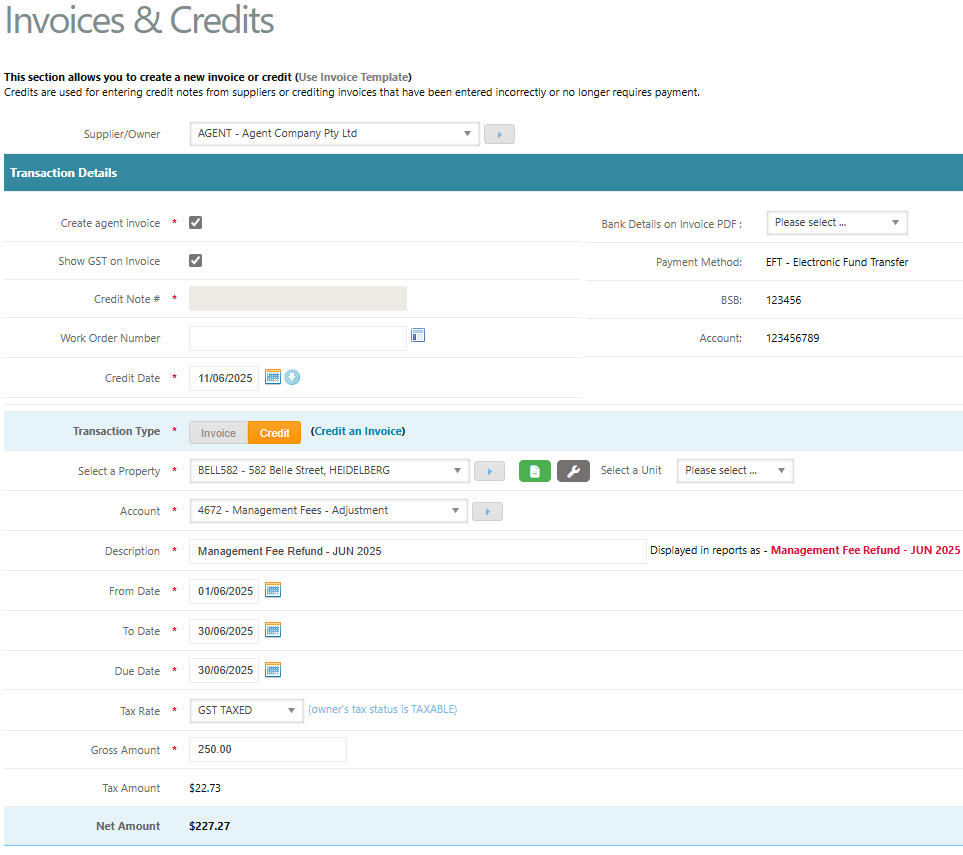
- Go to Accounts Payable > Invoices & Credits
- Supplier: Select your Agent Company
- Tick the Create Agent Invoice box. This will automatically allocate a tax invoice number when raised
- Bank Details: Choose the bank details to appear on the PDF invoice from the drop-down
- Enter the Invoice Date
- Transaction Type: Credit
- Select the Property entitled to the management fee refund
- Account Code: Select the relevant Management Fee Adjustment Code e.g. 4672, 5672 or 6672 - see article: Understanding Management Fee Adjustment Codes
- Enter the From Date, To Date and Due Date
- Tax Rate: Select the tax rate as per the owner's tax status
- Enter the Gross Amount as the management fee refund amount
- Click Process
- Click Complete
Step 2: Apply the Credit
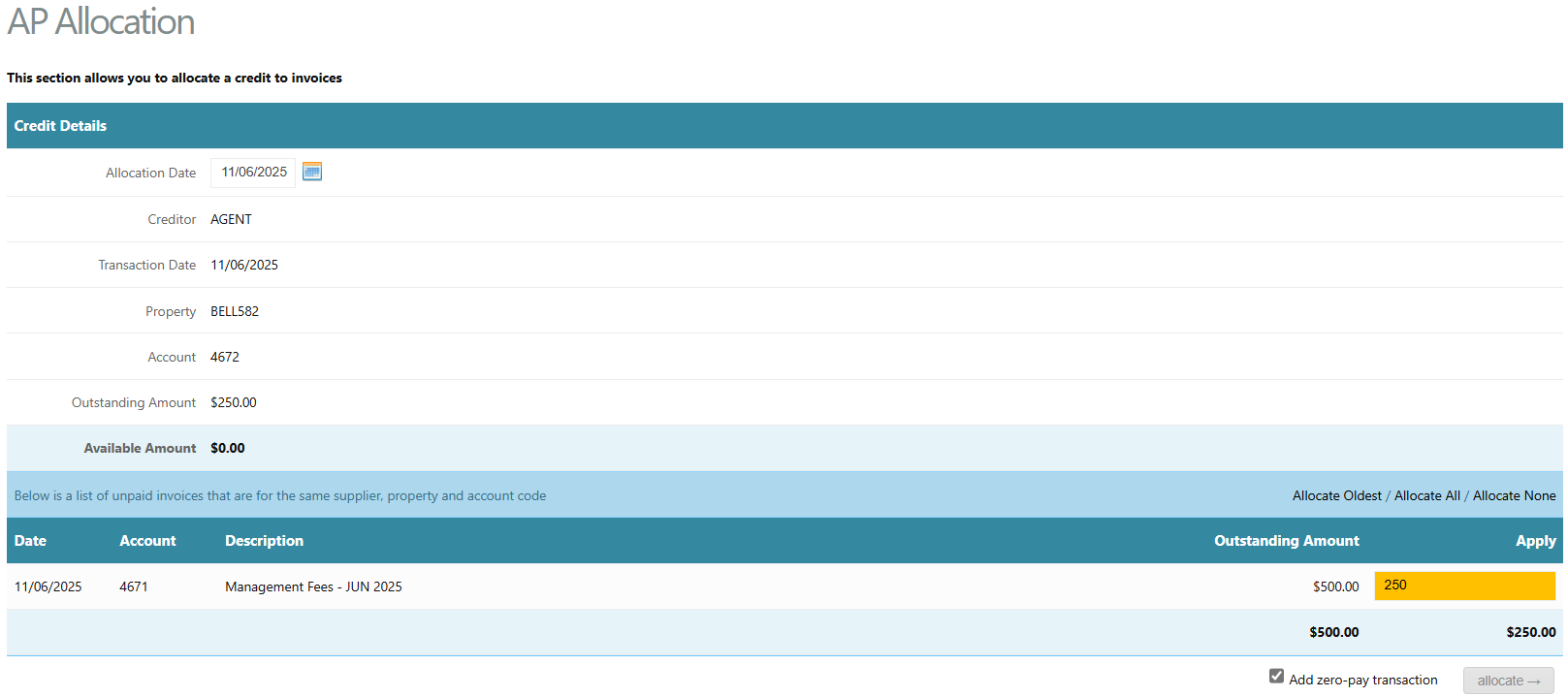
Apply the credit to a future management fee charge when it arises via:
- Accounts Payable > Credit Allocations
- Select your Agent Company as the Supplier
- Locate the relevant management fee credit transaction and click allocate against this transaction line
- Enter the amount of credit to apply to the charge
- Click allocate
Step 3: If the Management Fee Was Directly Recoverable
If the management fee that was refunded was a directly recoverable expense, then the lease that the management fee was originally paid by would need to receive a management fee credit.
- Raise a management fee credit to the relevant tenant using the directly recoverable management fee income code e.g. 3671. See article: Create an Accounts Receivable Invoice and Credit
- As there are no actual funds in the property for the management fee credit, and the accounts payable management fee credit raised in Step A will be applied to a future accounts payable management fee credit, ideally the tenant's management fee credit should only be applied to future tenant directly recoverable management fee charges to avoid insufficient funds towards other tenant charges.
Was this article helpful?
That’s Great!
Thank you for your feedback
Sorry! We couldn't be helpful
Thank you for your feedback
Feedback sent
We appreciate your effort and will try to fix the article