Management fees are calculated based on the account code ranges configured in the property's Management Fees Table.
Rex Cirrus8 automatically calculates and adds GST to Management Fees and Sundry Charges where applicable. Therefore, amounts entered should be GST-exclusive (net).
Management Fees – Fixed Monthly Amount
Enter the fixed monthly management fee excluding GST.
Example:
Management Fee (ex-GST): $500.00
GST (10%): $50.00
Total Management Fee (inc-GST): $550.00
Enter 500.00 in the Fixed Monthly Amount field. Rex Cirrus8 will calculate and add the applicable GST.
Management Fees – Percentage
Enter the management fee percentage excluding GST.
Rex Cirrus8 calculates the management fee as a percentage of eligible net receipts, then adds GST where applicable.
Example:
If the agreed management fee is 4.4% including GST, the GST-exclusive rate is 4%.
Management Fee Rate (ex-GST): 4%
GST Component: 0.4 percentage points
Effective Management Fee Rate (inc-GST): 4.4%
Enter 4 in the percentage field, not 4.4.
Sundry and Administration Charges
The same GST-exclusive calculation applies to Sundry and Administration Charges.
Example:
If an administration fee is $10.00 including GST:
Administration Fee (ex-GST): $9.09
GST (10%): $0.91
Total Administration Fee (inc-GST): $10.00
Enter 9.09 as the charge amount. Rex Cirrus8 will calculate and add the applicable GST.
Important
Always enter GST-exclusive amounts or rates when configuring Management Fees and Sundry Charges that attract GST. Rex Cirrus8 will calculate and add the applicable GST automatically.
Entering GST-inclusive amounts may result in GST being charged twice, producing an incorrect total.
Property Management Fee Setup
To check whether management fees apply:
- Navigate to Properties → Property Summary.
- Select the relevant property.
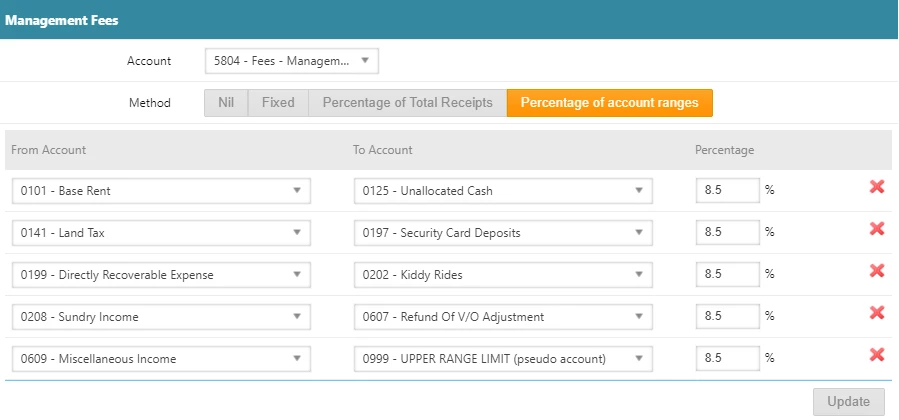
- Open the Management Fees Table.
- Identify the account code used for the transaction.
- Check whether the account code falls within a configured Management Fee range.
How Management Fees Are Calculated
- Within a Management Fee range: Management fees will be calculated when transactions are recorded against the account code.
- Outside all Management Fee ranges: No management fees will be calculated for transactions recorded against the account code.
Example
- Account 0101 – Base Rent: Falls within a configured Management Fee range, so management fees will be calculated.
- Account 0205 – Funds Received from Owner: Falls outside the configured Management Fee ranges, so no management fees will be calculated.
Important: Management Fee calculations depend on the account code ranges configured for each property. Always check the property's Management Fees Table to confirm which transactions attract management fees.

Adjusting a Tenant Invoice with an Incorrect GST Code
Management fees are calculated on the net receipt amount (excluding GST). If the net receipt amount is $0.00, no management fees will be calculated.
Scenario
A tenant was incorrectly configured as GST Free, resulting in an invoice being issued without GST when GST should have applied.
How to Correct the Invoice
Raise an Interim Invoice: Create an Interim Invoice for the original charge, including the applicable GST.
Apply a Credit: On the same Interim Invoice, enter a GST-free credit for the amount previously paid by the tenant.
Verify the Adjustment: Confirm that:
Only the outstanding GST amount remains payable.
The net amount of the adjustment is $0.00.
No additional management fees will be calculated on the adjustment.
This approach corrects the GST amount without applying additional management fees to the original net charge.
Related Guide
If the incorrect GST treatment resulted from the property's Owner GST Status, refer to the following guide for instructions on correcting affected Tenant Invoices:
Owner GST Status Incorrect – Tenant Invoice GST Status Incorrect
Changing Management Fees During the Month
If the management fee calculation method is changed during the month, Rex Cirrus8 recalculates the fees using the new method and deducts any management fees already paid during that month.
How to Adjust Management Fees
Update the Management Fee calculation method for the property.
Run the next management fee calculation or payment process.
Rex Cirrus8 calculates the fees using the updated method and deducts amounts already paid during the month.
Pay or hold any remaining management fees, as required.
Note: Changing the calculation method partway through a month may result in adjustments to account for management fees already paid.
Management Fee Configuration and Calculation
Management fees can be configured for each property using one of the following methods:
Fixed Monthly Amount (Net): A fixed monthly management fee, excluding GST.
Percentage of Total Receipts: A percentage of funds received.
Percentage of Selected Account Ranges: A percentage of receipts allocated to specified account codes.
How Management Fees Are Calculated
Funds are receipted against the property.
Rex Cirrus8 calculates management fees based on the property's configured method.
Any management fees already paid during the month are deducted from the calculated amount.
The system displays the total fees paid and any remaining balance.
Why Management Fees May Be Zero
Management fees may calculate as $0.00 when:
The fixed monthly fee has already been paid.
No eligible tenant receipts have been recorded.
The property has vacant units and no applicable receipts.
Important: Management fee calculations depend on the property's configuration and the transactions recorded during the period.
Property Has Insufficient Funds at Month End
If a property has a $0.00 balance but management fees remain outstanding, you can generate an invoice for payment in a future period.
Select Reserve.
Process the property.
Rex Cirrus8 generates an invoice for the outstanding management fees.
The invoice can be paid during a subsequent payment run when sufficient funds are available.
Insufficient Funds to Pay Management Fees in Full
If the property has insufficient funds to pay the full management fee amount, you can make a partial payment and hold the outstanding balance.
Part-Pay Management Fees: Allocate the available funds towards the management fees.
Hold Remaining Fees: Place the unpaid balance on hold.
Process the Property: Complete the property processing and payment run.
Generate Outstanding Invoice: Rex Cirrus8 generates an invoice for the unpaid management fees.
Pay Remaining Balance: Process the outstanding invoice in a subsequent payment run once sufficient funds are available.
Important: Ensure sufficient cleared funds are available before processing management fee payments from the trust account.
Was this article helpful?
That’s Great!
Thank you for your feedback
Sorry! We couldn't be helpful
Thank you for your feedback
Feedback sent
We appreciate your effort and will try to fix the article