This article details the available information and data displayed on the Executive Manager Plus dashboard.
TABLE OF CONTENTS
- Understanding Executive Manager Plus Dashboard
- Gross Profit Percentage Dial
- Properties
- Active Occupied Units
- Number of Owners
- Financial Year / Period / Monthly Option
- Portfolio - Management Income Vs Budget
- Portfolio - Management Income Vs Prior Year
- Account Code Management Income Vs Budget
- Account Code - Management Income Vs Prior Year
- Portfolio Trends
- Annual Rent Roll under Management
- Total Arrears Position
- Portfolio Makeup
- Top 5 Account by Arrears
- Arrears by days overdue
- Tenant with arrears
Understanding Executive Manager Plus Dashboard
The Executive Manager Plus Dashboard allows you to monitor and analyse your key business metrics using Cirrus8.
The Executive Manager Plus Dashboard can be made available to any Licensee or delegate requested by the Licensee. If you would like a demonstration of the dashboard, please obtain the required authority and email support@cirrus8.com.au.
The system will default to showing data for the current financial year, up to the most recent full period. For example, when opening the dashboard on the 15th of September, the system will default to showing you figures up to Period 2 (August) only.
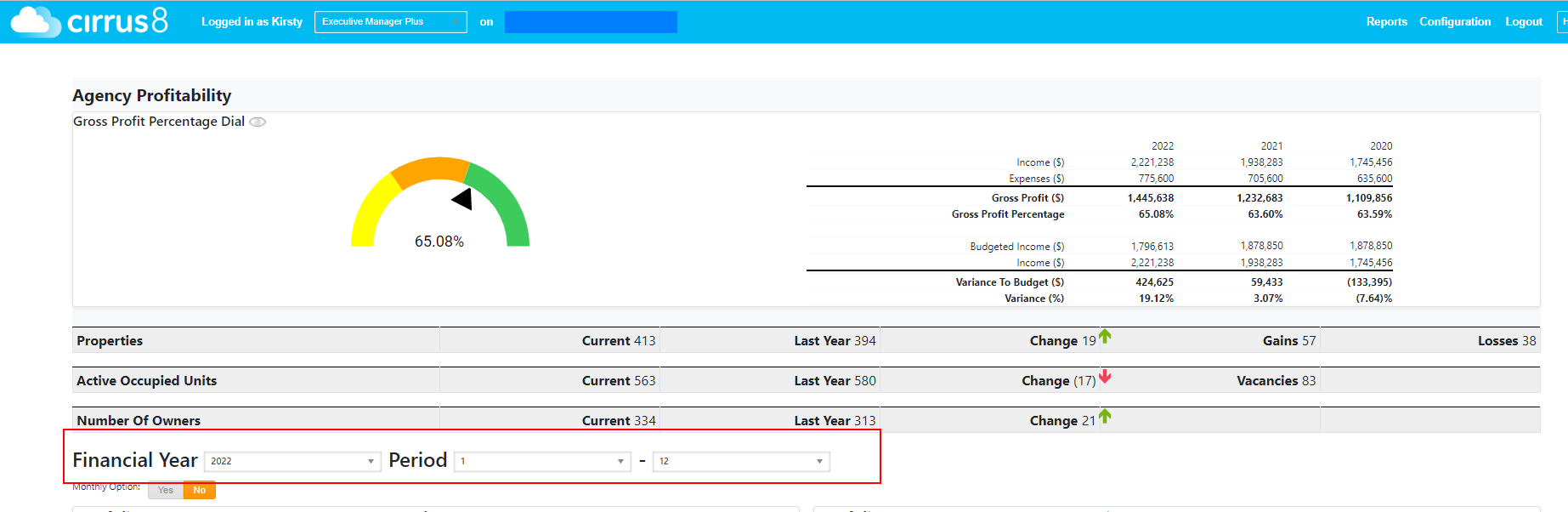
You can amend the period you wish to report on by changing the Financial Year & Period Range on the page - the example below will show me data for the full 2022 Financial Year
Gross Profit Percentage Dial
1. The dial will show the Gross Profit percentage for the period range selected, based on Management Fee income less the total cost per portfolios**. Management fee income includes management fees earnt on properties that have since been made inactive.
** Please refer to the Executive Manager Dashboard Configuration article on how to enter costs per portfolio
2. The table to the right-hand side provides figures for the same period selected over the previous two financial years and will also provide budget v actual figures. For example, if you are viewing periods 1 - 3 for FY23, it will also detail periods 1 - 3 for FY's 22 & 21 as a comparison:

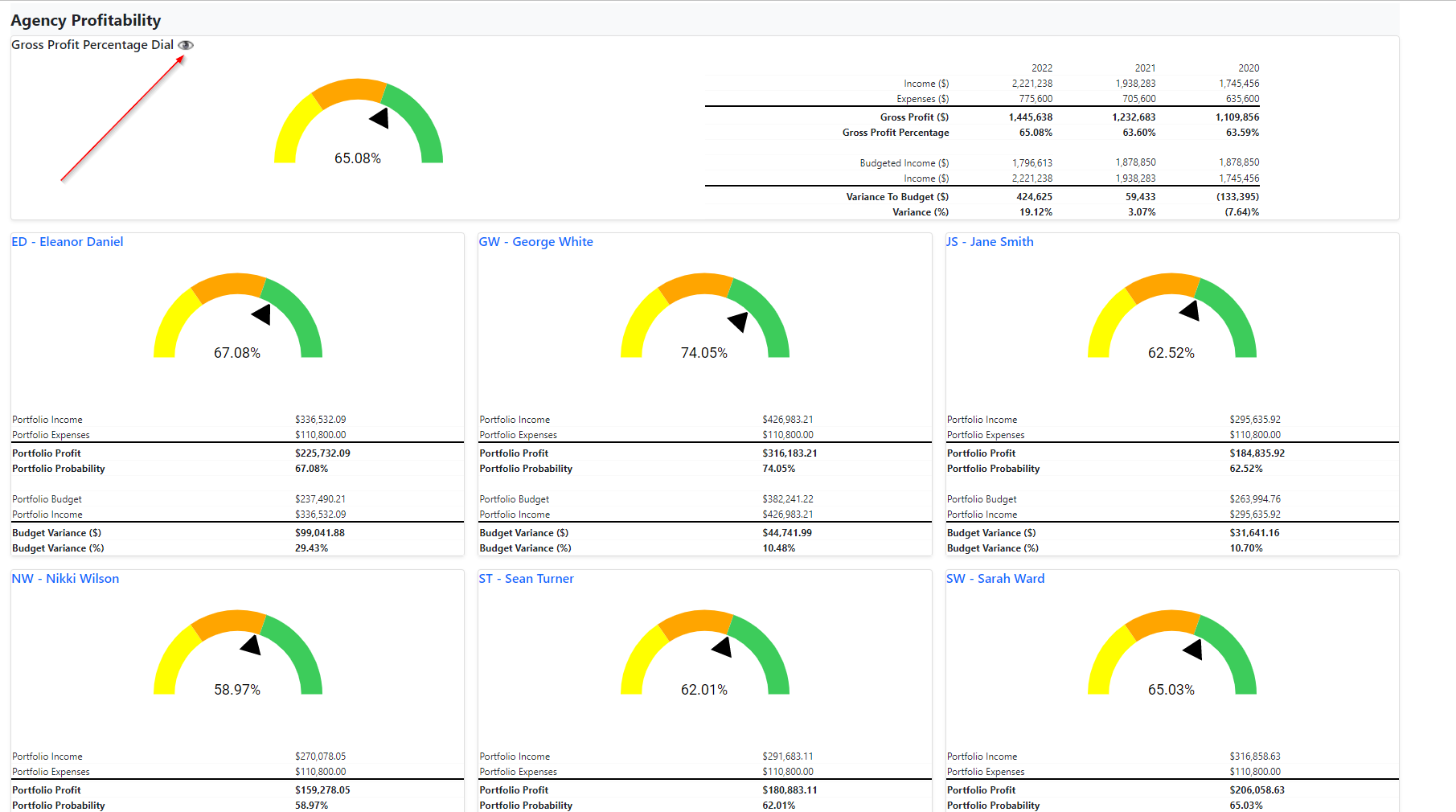
By clicking on the eye symbol beside 'Gross Profit Percentage Dial', the page will expand to show figures per portfolio manager (Clicking on the eye again will hide the breakdown by PM.):
You can then click on any PM's name and the rest of the page will then show figures only based on that PM's portfolio: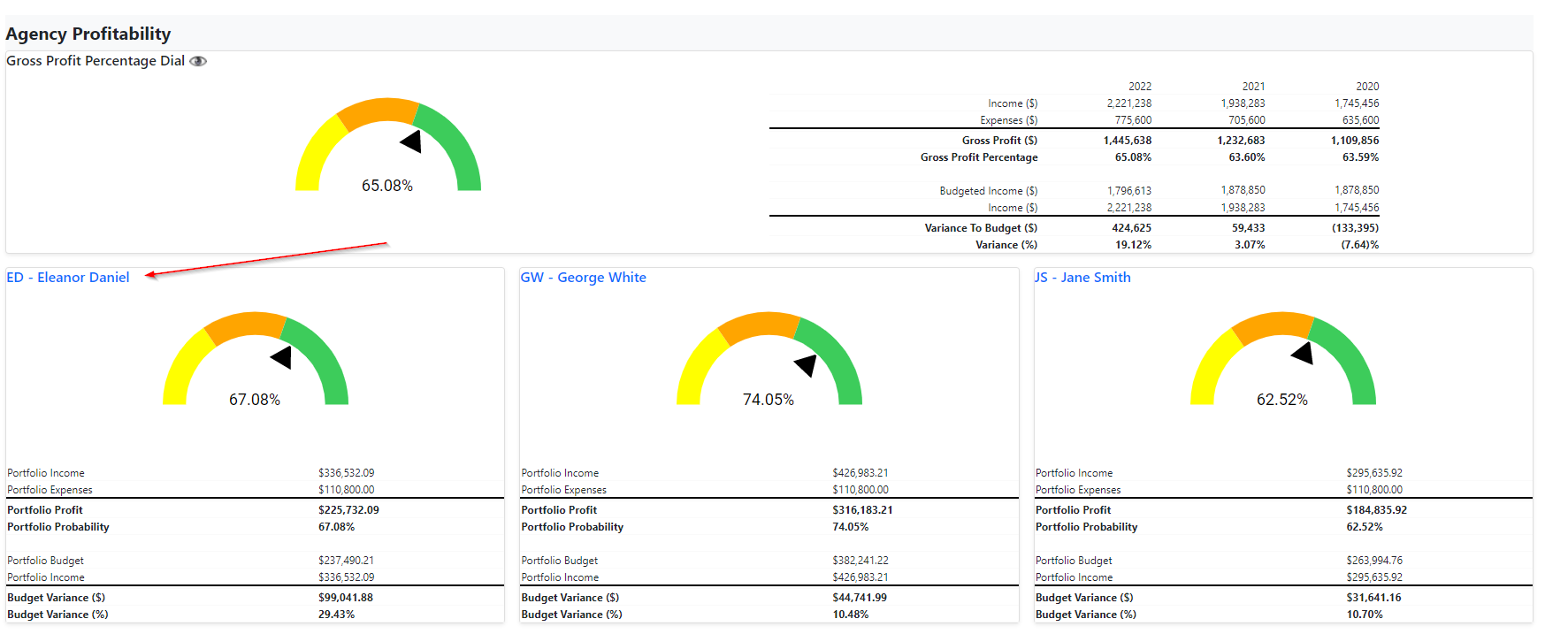
Properties
The properties section shows the movement in the number of active properties under management:
Current: # of active properties as at the last date of the selected period i.e. if showing Periods 1 - 2 of FY 23, this will be the number of active properties as at 31/08/2022
Last Year: # of active properties as at the 30th June of the previous financial year i.e. if showing Periods 1 - 2 of FY 23, this will be the number of active properties as at 30/06/2022
Change: Nett change in active properties between current & last year (gains less losses)
Gains: # of new properties added between the last financial year and the current period shown
Losses: # of properties made inactive between the last financial year and the current period shown
Click on the Properties line to expand and show figures per PM:

Active Occupied Units
This section shows the movement in the number of occupied units within active properties under management:
Current: # of occupied units within active properties as at the last date of the selected period i.e. if showing Periods 1 - 2 of FY 23, this will be the number of occupied unites within active properties as at 31/08/2022
Last Year: # of occupied units within active properties as at the 30th June of the previous financial year i.e. if showing Periods 1 - 2 of FY 23, this will be the number of active properties as at 30/06/2022
Change: Nett change in occupied units within active properties between current & last year
Vacancies: # of units marked as vacant within active properties as at the last date of the selected period
Click on the Active Occupied Units line to expand and show figures per PM:

Number of Owners
This section shows the number of owner companies linked to active properties under management
Current: # of owner companies linked to active properties as at the last date of the selected period i.e. if showing Periods 1 - 2 of FY 23, this will be the number of owner companies linked to active properties as at 31/08/2022
Last Year: # of owner companies linked to active properties as at the 30th June of the previous financial year i.e. if showing Periods 1 - 2 of FY 23, this will be the number of owners linked to active properties as at 30/06/2022
Change: Nett change in number of owner companies linked to active properties between current & last year
Click on the Number Of Owners line to expand and show figures per PM:

Financial Year / Period / Monthly Option
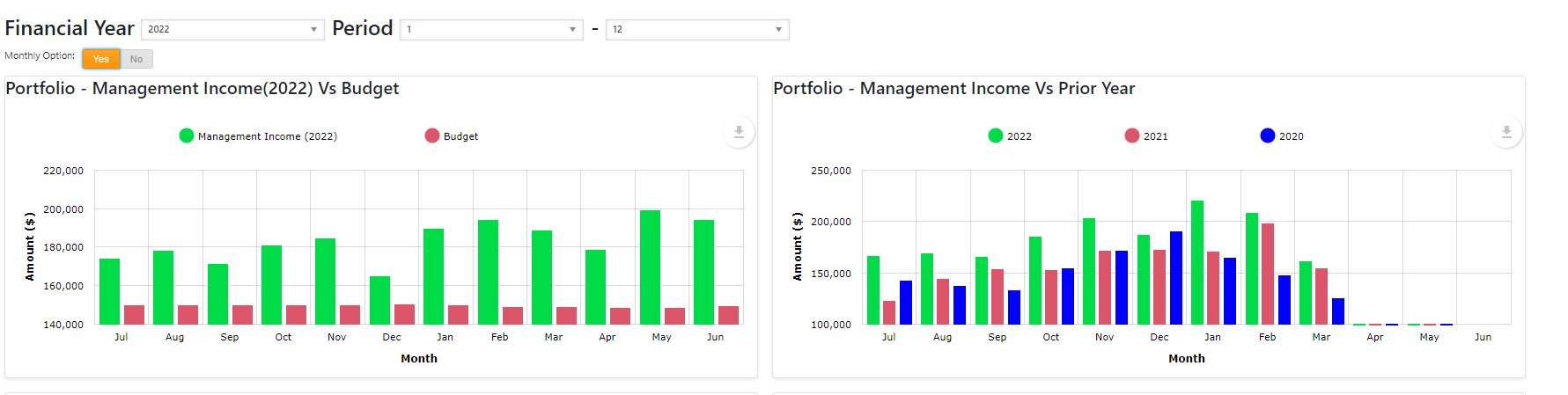
Select the Financial Year and Period range in which you wish to view the below data. Selecting Monthly Option: Yes will show the below graphs in a month-by-monthmonth view.
** Please note that by clicking on any PM's name under the Gross Profit Percentage Dial will show the following info for the selected PM only**
Monthly Option: No:
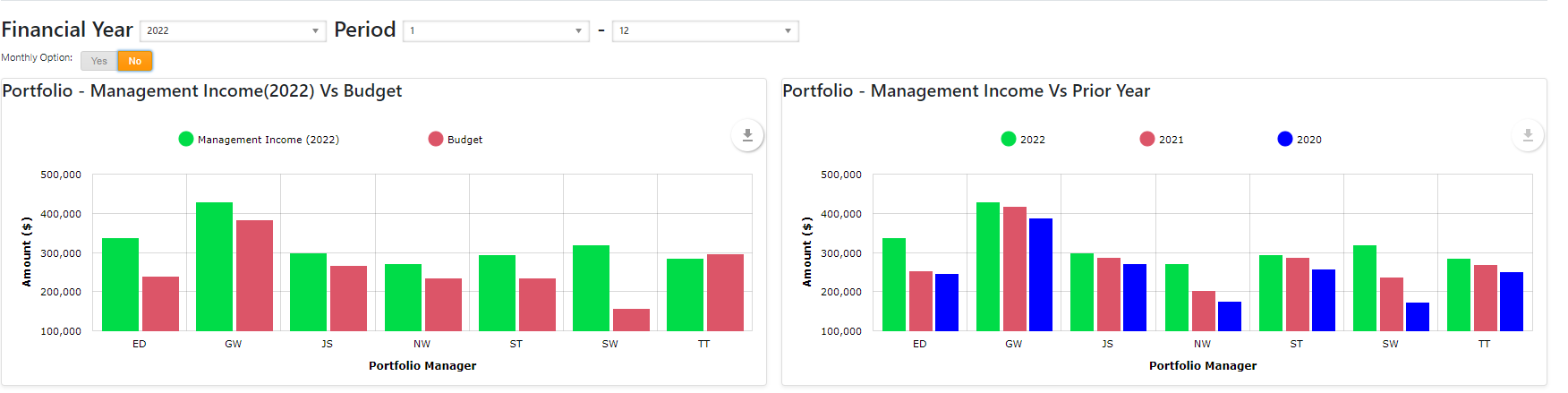
Monthly Option: Yes:
Portfolio - Management Income Vs Budget
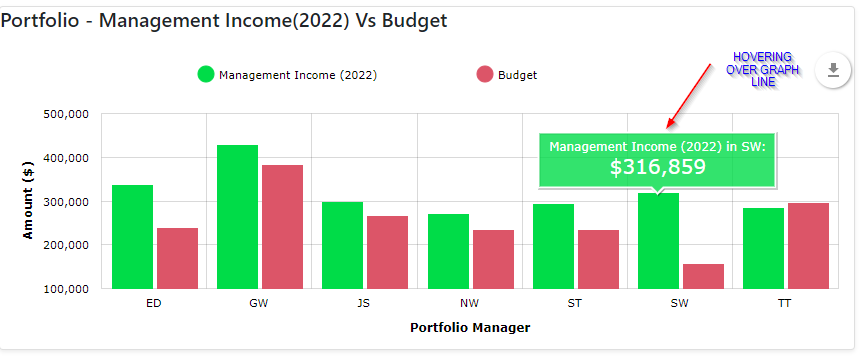
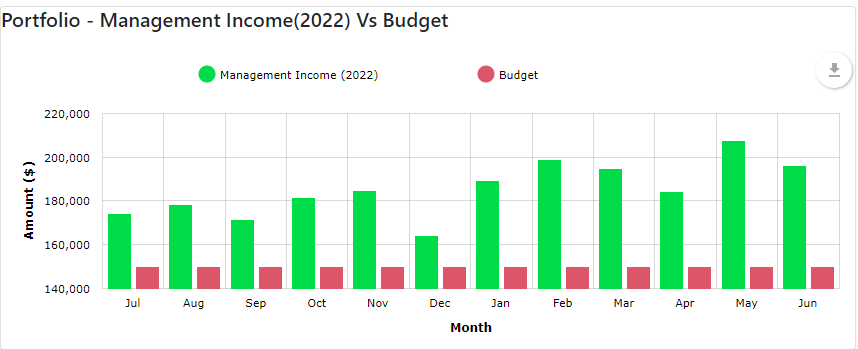
This graph provides a visual of management income vs budgeted management income, per portfolio. Management income figures are derived from any payments made to the agent company and coded to an account code marked as a management fee in the chart of accounts setup. Budgeted figures are derived from property budgets set in Cirrus8 and copied across to the Exec Dashboard, or as per what has been entered in the Executive Dashboard Configuration page (see notes here).
Hovering over the graph lines will provide an amount in figures.
When displaying the graph with Monthly Option set to No, the graph produces figures summed for each PM for the period range chosen:
When displaying with Monthly Option set to Yes, the graph produces figures for each month within the period range chosen (this version sums up all PM's figures and displays as a total amount per month):
 Portfolio - Management Income Vs Prior Year
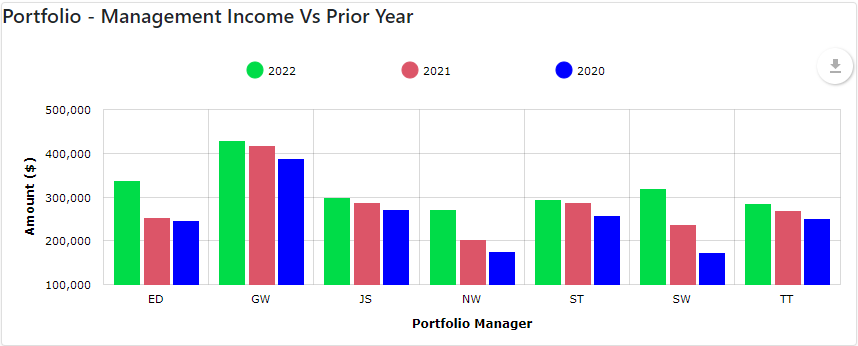
This graph provides a visual of management income earnt this year as a comparison to the same period in the previous 2 financial years. Management income figures are derived from any payments made to the agent company and coded to an account code marked as a management fee in the chart of accounts setup. For example, if you are viewing periods 1 - 3 for FY23, it will show a comparison to periods 1 - 3 for FY's 22 & 21.
Hovering over the graph lines will provide an amount in figures.
When run with Monthly Option set to No, the graph produces figures summed for each PM for the period range chosen above:
When run with Monthly Option set to Yes, the graph produces figures for each month within the period range chosen above (this version sums up all PM's figures and displays as a total amount per month):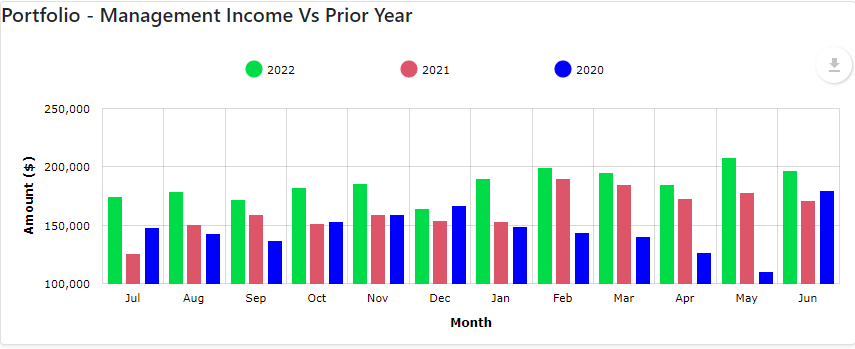
Account Code Management Income Vs Budget
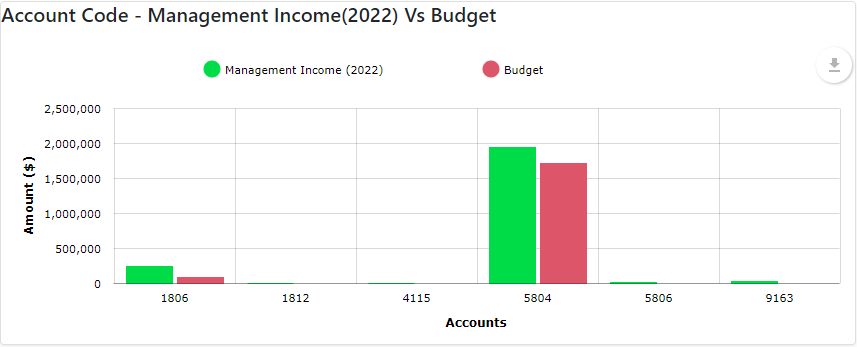
This graph provides a visual representation of management income vs budgeted management income, per account code marked as a management fee in the chart of accounts setup. This is designed to give a visual of management fees paid and budgeted for broken down into Owner costs, Variable Outgoings costs or Directly Recoverable costs for the period selected above
Hovering over the graph lines will provide an amount in figures.
Account Code - Management Income Vs Prior Year
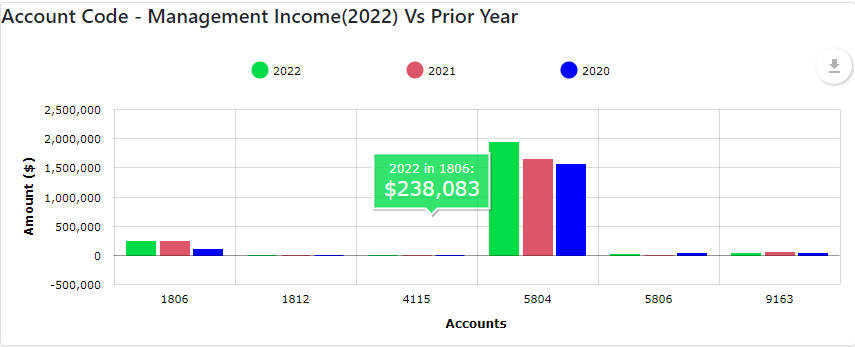
This graph provides a visual of management income vs prior years management income, per account code marked as a management fee in the chart of accounts setup. This is designed to give a visual of management fees paid within the current period chosen vs the same period in previous years, broken down into Owner costs, Variable Outgoings costs or Directly Recoverable costs.
Hovering over the graph lines will provide an amount in figures.
Portfolio Trends
These graphs provide visuals for the number of Properties, Active Occupied Units and Number of Owners under management. The first (green) bar will show the number as at the end period chosen above, the second (red) bar will show the number as at the end period chosen above in the prior year and the third (blue) bar will show the number as at the end period chosen above in the year prior to this.
For example, if you are viewing periods 1 - 12 for FY 22 the graph will show figures as at 30th June 2022, 30th June 2021 & 30th June 2020
Hovering over the graph lines will provide an amount in figures.

Annual Rent Roll under Management
This figure sums up all tenant charges less tenant credits over the 12 months prior to the end of the period chosen above.
The percentage change from the previous month/period will also be displayed:

Total Arrears Position
This figure sums up each tenant balance as at the end of the period chosen above. This includes vacated tenants and tenants with a credit balance (prepaid tenants).
**Please note that this may take some time to calculate for larger databases - please be patient and wait until the processing wheel has disappeared for a final figure**
The percentage change from the previous month/period will also be displayed:

Portfolio Makeup
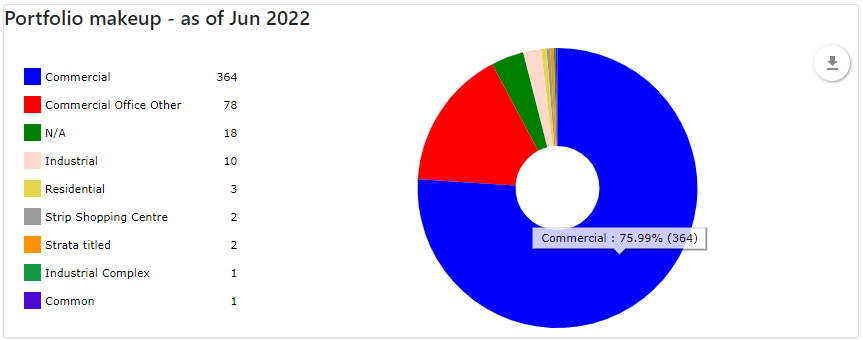
This graph provides a visual of the makeup of the portfolio based on the Property Type selected when setting up properties in Cirrus8. This information is derived from active properties as at the end of the period chosen above.
Hovering over the graph will provide a percentage breakup also:
Top 5 Account by Arrears
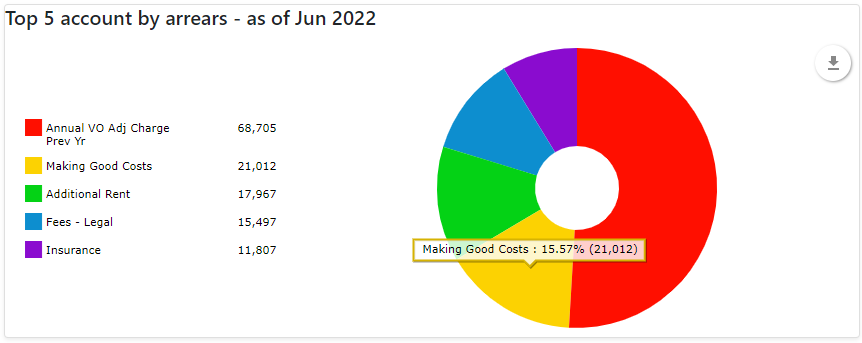
This graph provides a visual of the top 5 arrears types by account code as at the end of the period chosen above. The description is derived from the name of the account code used and is ordered from highest to lowest. This takes into account vacated tenants and tenants in credit (prepaid).
Please note that when run at the end of each month, many tenants are likely to have paid the upcoming month's rent and are therefore noted as a tenant in credit (prepaid).
Hovering over the graph will provide a percentage breakup also:
 Arrears by days overdue
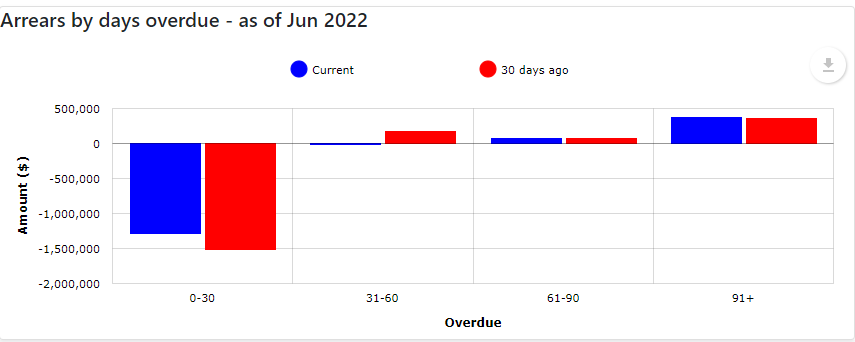
This graph provides a visual of the dollar value of arrears by the number of days outstanding as at the end of the period chosen above, compared to 30 days earlier.
For example, if you are viewing periods 1 - 12 for FY 22 the graph will show figures as at 30th June 2022 compared to 30 days prior (31st May 2022).
Hovering over the graph will provide an exact dollar value.
Tenant with arrears
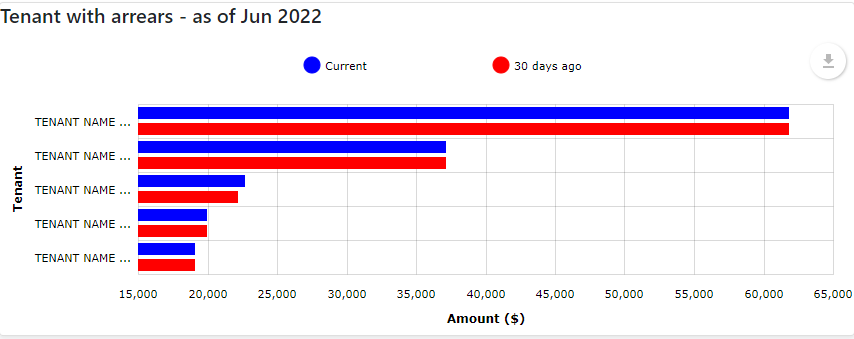
This graph provides a visual of the top 5 tenants in arrears by dollar value. The graph will display the outstanding amount as at the end of the period chosen above, compared to the outstanding amount of each 30 days ago.
Hovering over the graph will provide an exact dollar value.
Was this article helpful?
That’s Great!
Thank you for your feedback
Sorry! We couldn't be helpful
Thank you for your feedback
Feedback sent
We appreciate your effort and will try to fix the article