This article details the various type of reports available in Executive Manager Plus. These reports can be accessed going to Executive Manager Plus > Reports.
TABLE OF CONTENTS
Agency Fees Report
The below reports are run per financial year selected.
Note: Each report takes the gross amount paid to the agency / 1.1 to provide the true Nett figure paid
- Management Fees by Property
- This report details all fees paid to the agent company that are coded to a management fee account code, by property
- This report details all fees paid to the agent company that are coded to a management fee account code, by property
- Management Fees by Portfolio Manager
- This report details all fees paid to the agent company that is coded to a management Fee account code, by portfolio manager
- This report details all fees paid to the agent company that is coded to a management Fee account code, by portfolio manager
- Management Fees by Property & Portfolio Manager.
- This report details all fees paid to the agent company that is coded to a management fee account code, by portfolio manager & property
- This report details all fees paid to the agent company that is coded to a management fee account code, by portfolio manager & property
- All Fees
- This report details all fees paid to the agent company and is broken down by account code
- This report details all fees paid to the agent company and is broken down by account code
- Management Fees – Actual vs Budget by Property
- This report details all fees paid to the agent company that are coded to a management fee account code v anything budgeted to a management fee account code per property
- This report details all fees paid to the agent company that are coded to a management fee account code v anything budgeted to a management fee account code per property
- Management Fees – Actual vs Budget by Portfolio Manager
- This report details all fees paid to the agent company that are coded to a management fee account code v anything budgeted to a management fee account code per portfolio manager
- This report details all fees paid to the agent company that are coded to a management fee account code v anything budgeted to a management fee account code per portfolio manager
- All Fees by Portfolio Manager
- This report details all fees paid to the agent company and is broken down by portfolio manager and account code
- This report details all fees paid to the agent company and is broken down by portfolio manager and account code
Fees Received
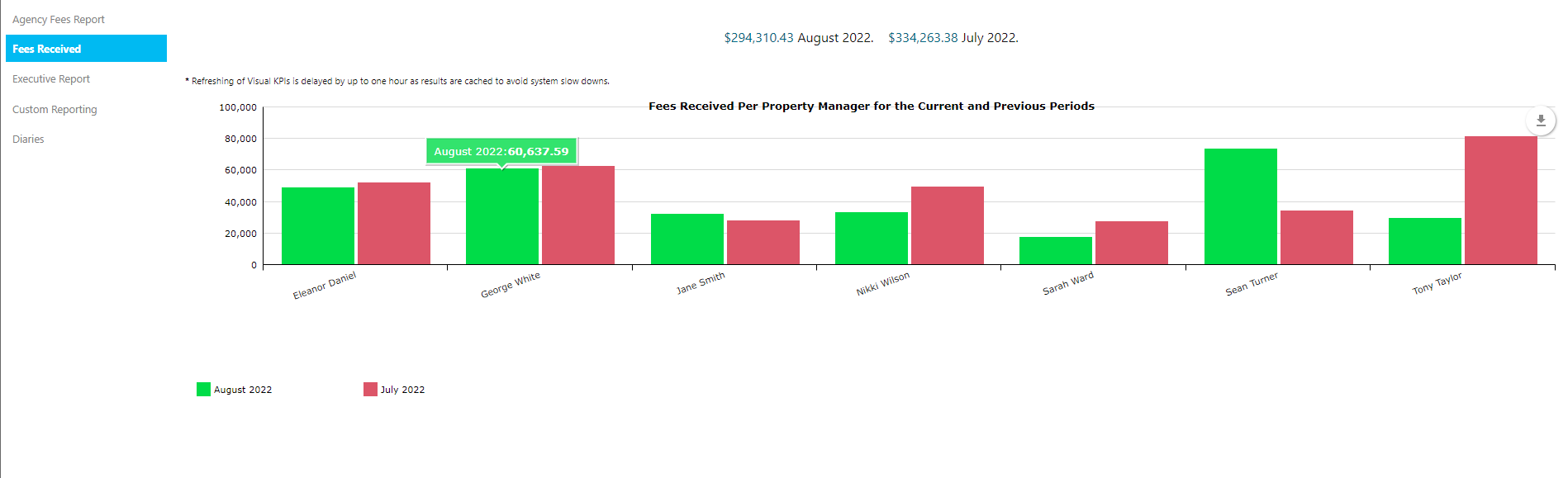
This section shows an overview of fees paid per portfolio manager. The graph displays data from the prior month as a comparison to the month/year prior. Hovering over the graph lines will detail the month and amount and clicking on any graph line will further break this down into each property within the relevant portfolio.
Executive Report
This section allows the user to run various executive reports:
- Properties
- Shows the number of active properties per portfolio manager, per month as at today’s date and the last date of each month for the year prior
- Shows the number of active properties per portfolio manager, per month as at today’s date and the last date of each month for the year prior
- Active Occupied Units
- Shows the number of active properties per portfolio manager, per month as at today’s date and the last date of each month for the year prior
- Shows the number of active properties per portfolio manager, per month as at today’s date and the last date of each month for the year prior
- Number of Owners
- Shows the number of Owners linked to properties within each portfolio, per month as at today’s date and the last date of each month for the year prior
- Shows the number of Owners linked to properties within each portfolio, per month as at today’s date and the last date of each month for the year prior
- Management Fees By Primary Owner
- Shows the total management fees paid per primary owner for the current financial year, ordered from highest to lowest YTD
- Shows the total management fees paid per primary owner for the current financial year, ordered from highest to lowest YTD
- Management Fees By Company Group
- Shows the total management fees paid per company group for the current financial year, ordered from highest to lowest YTD. Management Fees are grouped per owner group and primary owner.
- Shows the total management fees paid per company group for the current financial year, ordered from highest to lowest YTD. Management Fees are grouped per owner group and primary owner.
- Property Changes for period
- Shows any movement within the number of properties under each PM’s management within the period selected at the top of the screen
Custom Reporting
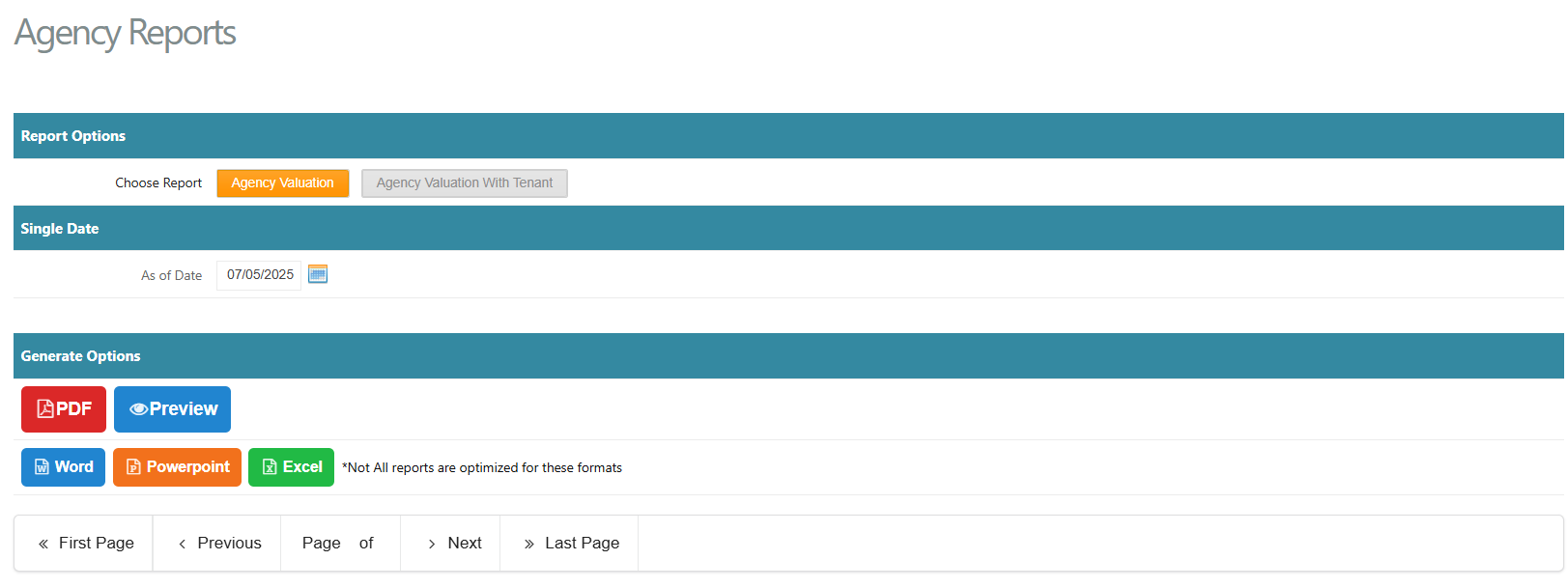
This section allows the user to generate the Agency Valuation report or the Agency Valuation With Tenant report. These reports can be generated in various formats.
 Diaries
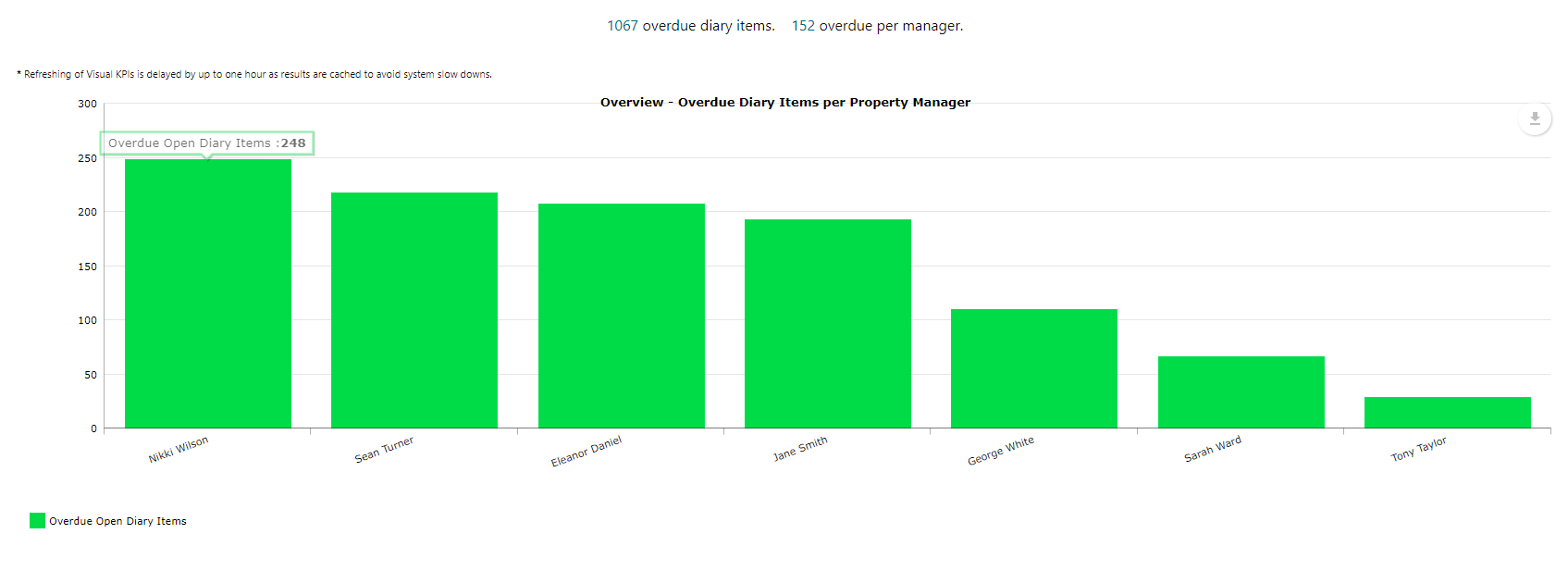
This section gives a visual of the number of overdue diary items per Property Manager as at the current date. You can click on each graph line to further break this down by diary type > clicking on each diary type will then provide a list of all overdue diary items, the property/lease it relates to and the date it was due.
Hovering over each bar graph will also provide a figure:
Arrears Report
This section generates a report which displays a line-by-lineine breakdown of the unpaid balance in the chose tenant's account as at the date chosen. The report is generated based off the charge due date, not the transaction/invoice date.
Was this article helpful?
That’s Great!
Thank you for your feedback
Sorry! We couldn't be helpful
Thank you for your feedback
Feedback sent
We appreciate your effort and will try to fix the article