Login Settings is a security feature that manages how users are allowed to login and where the various criteria are configured to control how users can login to their Cirrus8 database. These settings can be accessed through the Admin Portal>Login Settings button via the URL https://admin.cirrus8.com.au/. This article covers how to manage password and login settings as a Local Admin user.
TABLE OF CONTENTS
Manage Password Settings
Complexity of passwords can be set to none, simple, moderate or complex. This is the password policy Cirrus8 applies to a normal login. However, this is not applicable to logging in from say Office365.
Number of days expiration refer to the number of days a password can be valid until the user has to change it. This also applies to a normal login.
Manage Login Settings
Multi-factor authentication can be set to disabled, enabled or forced. Note if authentication is already being required to login to say Office365, then setting authentication within Cirrus8 would be a second set of authentication required.
Normal login refers to logging into Cirrus8 using a username and password.
For better security this should be disabled thus forcing the users to login via Office365 and using its authentication.
Google and Office365 login options allow users to access Cirrus8 once they are logged into Google or Office365. This requires the correct set up and secret keys to be shared with your IT Administrator and Cirrus8’s technical staff which includes registering Cirrus8 as a custom App. Businesses use this effectively to control staff access to all their systems in one place in Google or Office365. Note the Office365 or Google login email needs to be the same as the cirrus8 login email address.
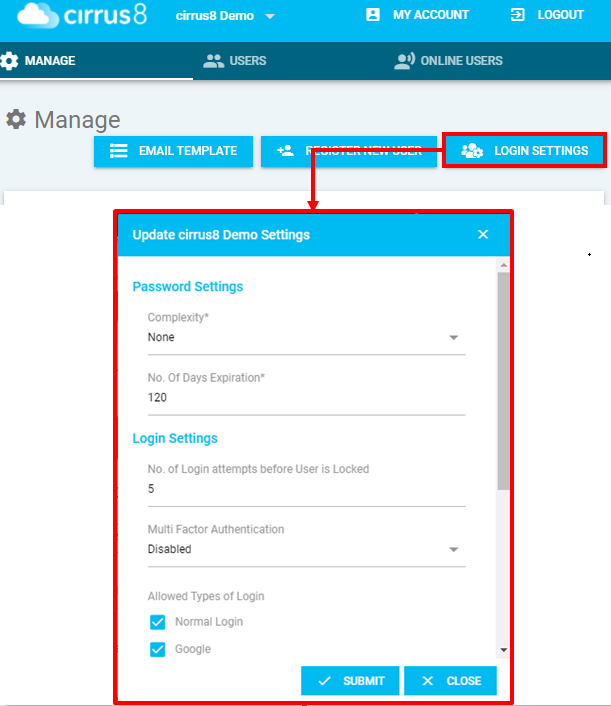
Update the Password and Login Setting values as needed then click Submit. A successful message will appear for the updated settings.
Was this article helpful?
That’s Great!
Thank you for your feedback
Sorry! We couldn't be helpful
Thank you for your feedback
Feedback sent
We appreciate your effort and will try to fix the article