a property / owner has received an amount for interest, and you would also like to deduct an amount for bank fees from a property?
If this is the case, to receipt the interest amount to the owner’s property you can do this via:
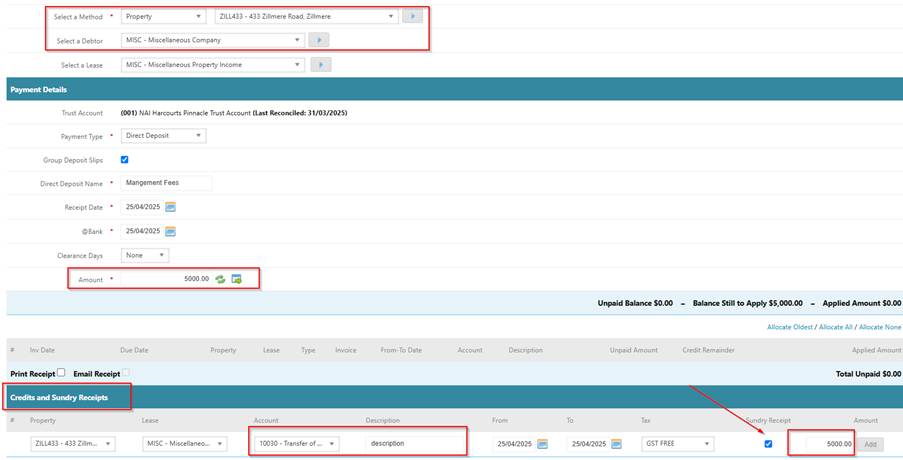
Receivable > Receipts
- Select the property
- Select the misc lease
- Enter receipt & at bank date
- Enter the amount to receipt
- Click add Credit / Sundry Receipt
- Change account code to 10030
- Enter Description (this will appear on owner statement)
- TICK sundry receipt
- Click add
- Process
For the bank fees you will need to create a supplier company for the required bank.
Once created you then enter an accounts payable invoice via Accounts Payable > Invoice & Credits, use this supplier and the required property and enter an invoice for the bank fees amount.
You would then process a dummy payment run for the invoice to reflect the payment out of the bank.
Was this article helpful?
That’s Great!
Thank you for your feedback
Sorry! We couldn't be helpful
Thank you for your feedback
Feedback sent
We appreciate your effort and will try to fix the article