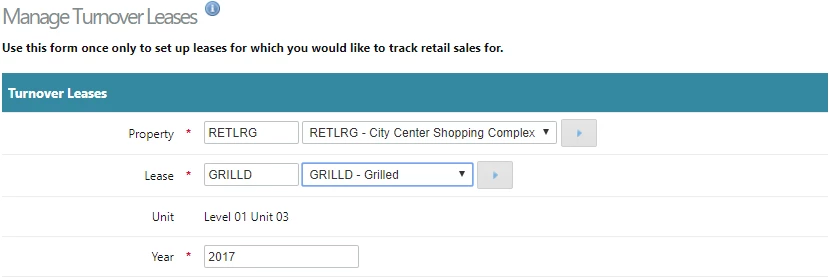
- Select a Property and lease.
- Enter the financial or calendar year to record.
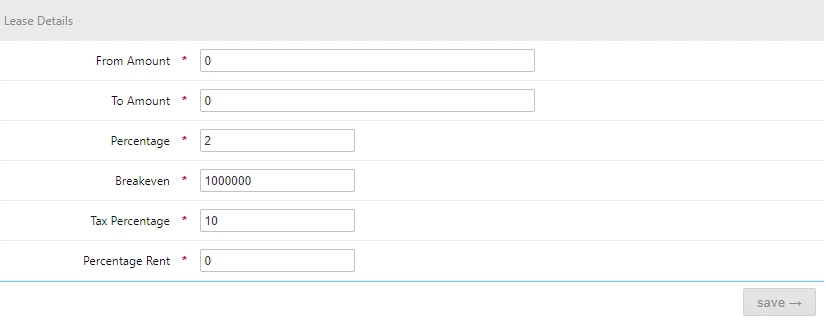
From and To amounts - enter 0 unless the percentage rent is only applied to certain ranges. Contact cirrus8 support to clarify set up is correct.
Percentage that applies to sales the tenant generates, numerical only, e.g. tenant pays percentage rent of 2% of sales, type in 2.
Break-even sales amount that applies to the year selected, e.g. tenant sales must exceed $1 million before they pay percentage rent, enter: 1000000.
- Tax percentage - average rate of GST that applies to the tenants sales, obtained from tenant e.g. If all tenant sales attract GST enter 10 if not adjust e.g. 3.
Percentage rent the tenant has been charged for the year over and above the base rent and other lease charges. This is added to the other tenant charges to calculate an occupancy percentage. Enter 0 if it is nil.
Was this article helpful?
That’s Great!
Thank you for your feedback
Sorry! We couldn't be helpful
Thank you for your feedback
Feedback sent
We appreciate your effort and will try to fix the article