Property calendars need to be extended out each year to create additional 12-month periods to enable transactions and data to be recorded during these periods e.g. entering a budget or raising a future dated charge to a tenant. Only a Trust Accountant user has the ability to extend a property calendar.
If you receive an error message advising that "no calendar entry exists", or that "a period (calendar entry) cannot be found for this AR transaction date", this means that the property calendar needs to be extended.
To extend property calendars in bulk or individually, go to:
- Configuration > Manage Calendar
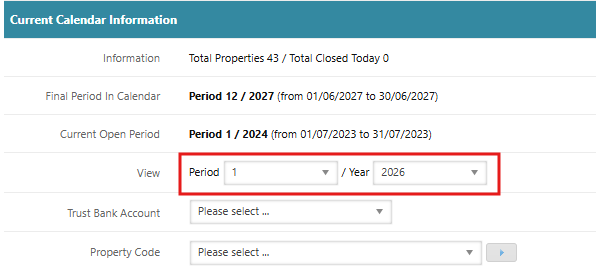
- In the Current Calendar Information section, under View – Select Period 1 and the Financial Year e.g. 2026
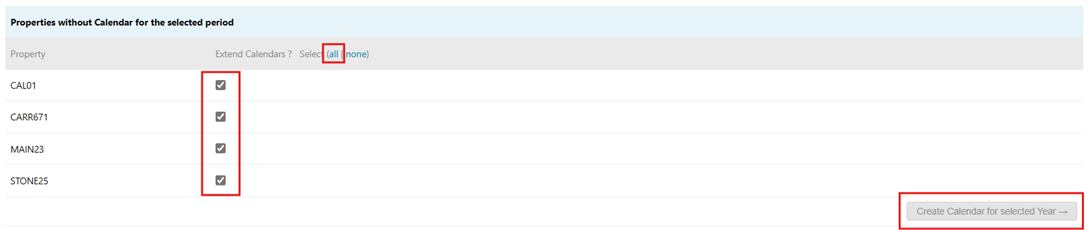
- Create Calendar Period – Scroll down to the section 'Properties without Calendar for the selected period' and select the relevant property or select all then click 'Create Calendar for selected Year' to extend the calendar for the selected properties.
Was this article helpful?
That’s Great!
Thank you for your feedback
Sorry! We couldn't be helpful
Thank you for your feedback
Feedback sent
We appreciate your effort and will try to fix the article