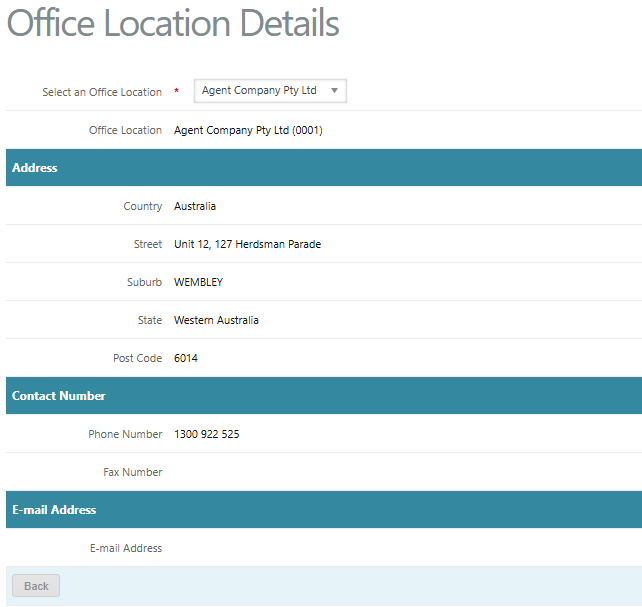
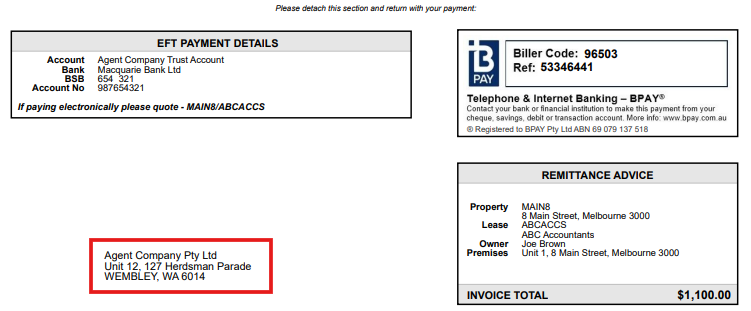
The Manage Remittance Office section allows a Trust Accountant user to set up and configure the Remittance Office. This is the location the managing agent is issuing tenant tax invoices from. Once the Remittance Office has been set up, this will appear at the bottom of tenant tax invoices in the remittance section. This is located under Configuration > Manage Remittance Office.
Add New Office Location
To add a new remittance office to the database, go to:
- Configuration > Manage Remittance Office
- Click Add New Office Location
- Enter a new Location Code e.g 0001, or 0002
- Enter the name of the office location in the Description field
- Complete the postal address, contact numbers and email address of the office location
- Enter any notes in relation to the office location
- Click Save
View, Edit or Delete Office Location
To view, edit or delete an existing office location, go to:
- Configuration > Management Remittance Office
- Locate the relevant office location
- Click View to view the details of the office location
- Click Edit to go to the office location form > make the required changes > click Save
- Click Delete > Click OK to confirm deletion

Was this article helpful?
That’s Great!
Thank you for your feedback
Sorry! We couldn't be helpful
Thank you for your feedback
Feedback sent
We appreciate your effort and will try to fix the article