A Bond Ledger is a centralised ledger that consolidates all bond funds, with each individual bond tracked separately within its own Sub-Ledger, allowing for clear segregation, accurate tracking and streamlined reporting.
Before bonds can be managed effectively, the Bond Ledger must be set up and configured by a Trust Accountant user within the Sales Trust Module. This article details the steps involved in the initial set up required.
Add Bond Account In System Configuration
This configuration enables you to generate a bond invoice against the main property. While funds are receipted to the main property and lease, the system will automatically journal the amounts to the appropriate Ledger and Sub-Ledger as unallocated funds. To do this, go to:
- Configuration > System Configuration
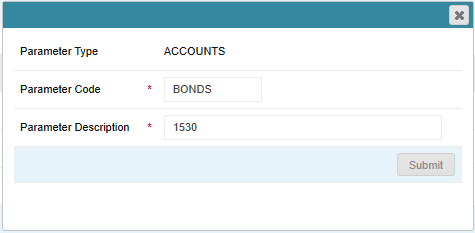
- Select the ACCOUNTS Parameter Type from the drop-down menu.
- If this has not been set up in your database, click on Add New Parameter Type > Enter ACCOUNTS as the Parameter Type and ACCOUNTS as the Parameter Description > Click Submit
- Click Add New Parameter
- Enter BONDS as the Parameter Code
- Enter the Parameter Description as the account code for bonds e.g. 1530
- Click Submit
Add Bond Agent In System Configuration
A Bond Agent will need to be created to assign to the Bond ledger. To do this, go to:
- Configuration > System Configuration
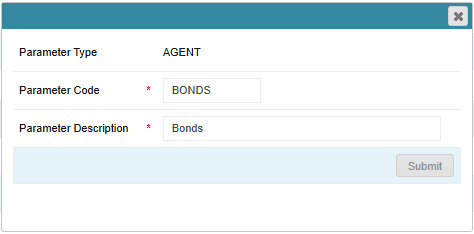
- Select the AGENT Parameter Type from the drop-down menu.
- Click Add New Parameter
- Enter BONDS as the Parameter Code
- Enter Bonds the Parameter Description
- Click Submit
Configure Agent Company As An Owner Company Type
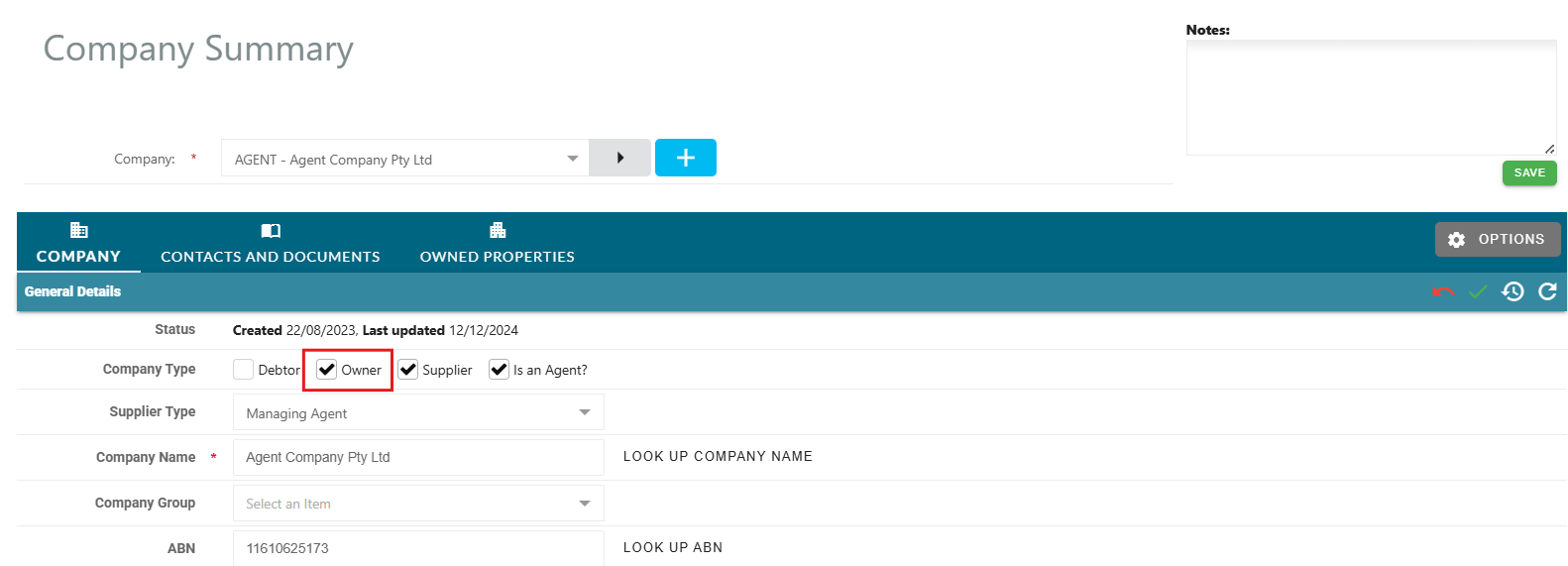
Your Agent Company will need to be configured as an Owner Company Type to enable the ability to assign the Agent as the Owner of the Bond Ledger. To do this, go to:
- Companies > Company Summary
- Select your Agent Company from the drop-down menu
- Click on the Edit Pencil to the right
- Select the Owner Tick Box
- Click on the Green Tick icon to the right to save the update
Create Bond Ledger
To create a bond ledger, go to:
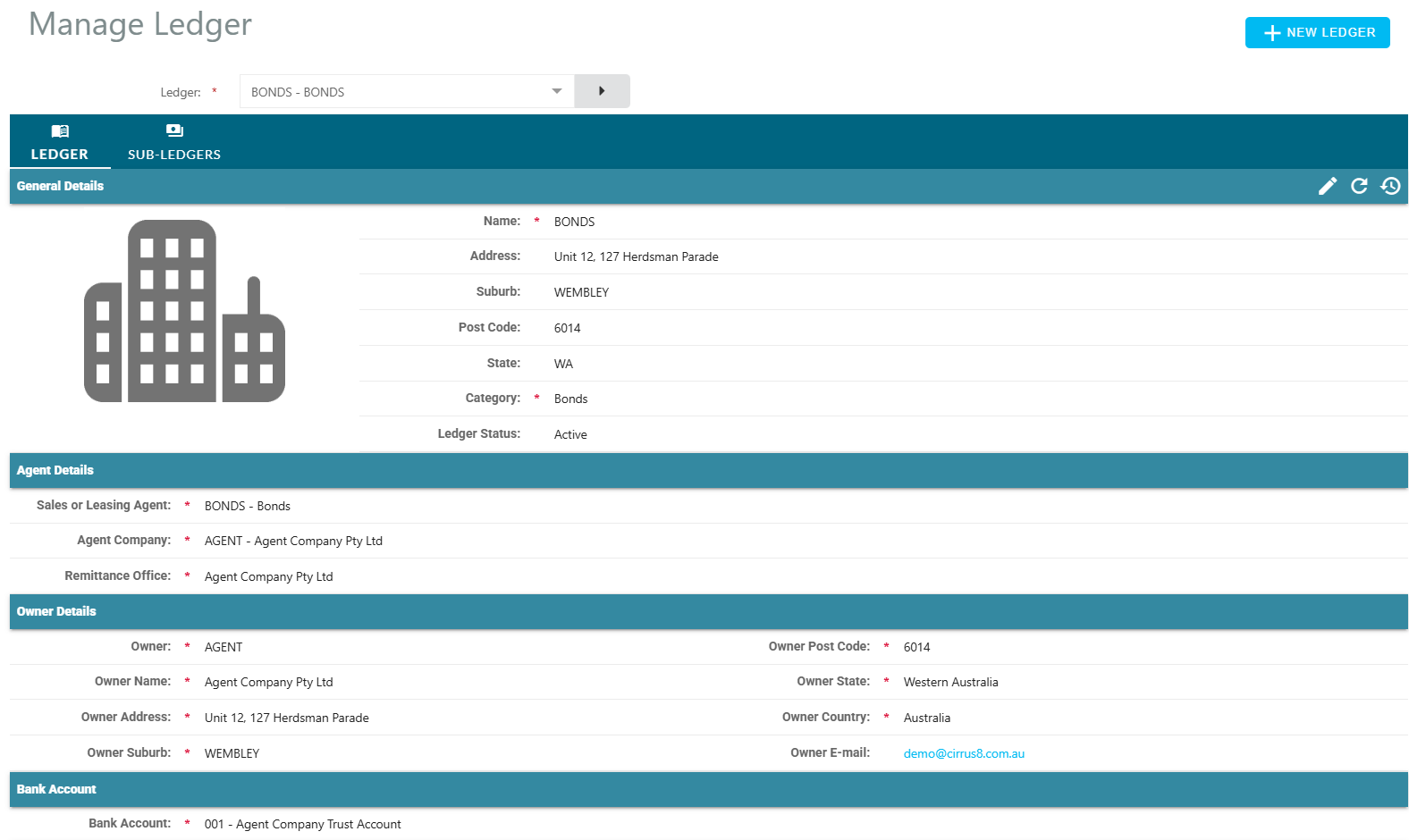
- Sales Trust > Manage Ledger
- Click on + New Ledger
- Enter BONDS as the Ledger Code
- General Details:
- Name - Enter Bonds as the Ledger Name
- Address, Suburb, Postcode and State - Enter your office location address details
- Category - Select Bonds from the drop-down menu
- Agent Details:
- Sales or Leasing Agent - Select Bonds
- Agent Company - Select your agent company
- Remittance Office - Select the remittance office of your agent company
- Owner Details:
- Company Type - select Existing and find your Agent Company from the drop-down menu
- Bank Account:
- Select the appropriate Bank Account for the Bond Ledger from the drop-down menu. This should be the trust account where bond funds will be held and deposited into.
- Click Save Details
Was this article helpful?
That’s Great!
Thank you for your feedback
Sorry! We couldn't be helpful
Thank you for your feedback
Feedback sent
We appreciate your effort and will try to fix the article