A tenant's bond (or security deposit) may be used to cover unpaid rent, damages, or other outstanding charges at the end of a tenancy. This article outlines the steps to apply a bond to tenant invoices.
Steps to Apply Bond to Outstanding Invoices
- Navigate to Accounts Receivable > Receipts
- Select by Debtor and select the Debtor Company attached to the main lease
- Select the Payment Type as Direct Deposit
- Change the Receipt Date and @Bank Date to today’s date
- Leave the Amount as “0”
- Click on Enable Credits and click Yes to the pop up warning message
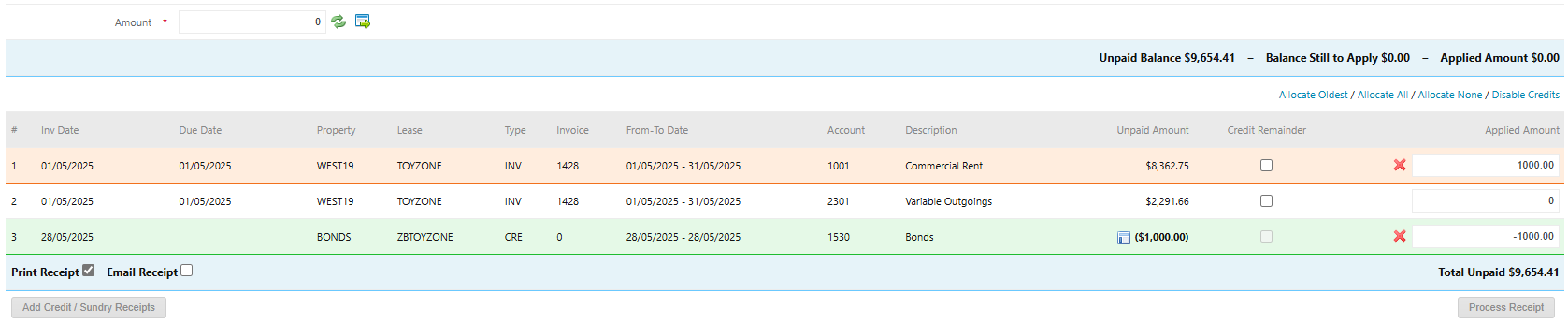
- Select the bond credit in the Applied Amount column by either double clicking the credit in the Applied Amount box or entering a partial credit to be taken up as a negative value.
- Select the invoices to apply the bond credit against in the Applied Amount column by either double clicking the invoice in the Applied Amount column or entering a partial amount to be applied across various invoices. Ensure that the Balance Still to Apply now shows as $0.00.
- Click Process Receipt
Once the bond has been applied to the tenant’s invoices, the funds will now be available in the property. These funds can then be used to pay supplier invoices (e.g. cleaning, repairs) or disbursed to the owner via Create Payments.
Was this article helpful?
That’s Great!
Thank you for your feedback
Sorry! We couldn't be helpful
Thank you for your feedback
Feedback sent
We appreciate your effort and will try to fix the article