Purpose
The Sales/Leasing Deposit Form is used to record all relevant details for a deposit received in relation to a property sale or leasing transaction. This ensures accurate allocation of funds and proper handling of trust monies.
Procedure
Step 1: Receive Deposit
When a deposit is received for a property sale or leasing transaction, confirm the amount, payment method, and the property or tenancy it relates to.
Step 2: Access the Sales/Leasing Deposit Form
The Property Manager must locate the Sales/Leasing Deposit Form within the Properties section of the system.
Step 3: Complete the Form
Enter all required information accurately, including:
Property details
Tenant or purchaser details (if applicable)
Deposit amount
Date received
Payment method
Any relevant notes or references needed for allocation
Ensure all entries are checked for accuracy before submission.
Step 4: Submit the Form to Trust Accounting
Once completed, submit the form to the Trust team to notify them of the deposit and provide instructions for allocation.
Step 5: Trust Allocation
The Trust team will:
Review the submitted form
Verify the deposit details
Allocate the funds to the appropriate trust account and ledger
Step 6: Record Keeping and Compliance
Ensure all documentation related to the deposit is retained according to company policy and regulatory requirements. This includes the completed form and any supporting records.
Additional Guidance
For more details see Sales and Leasing Procedure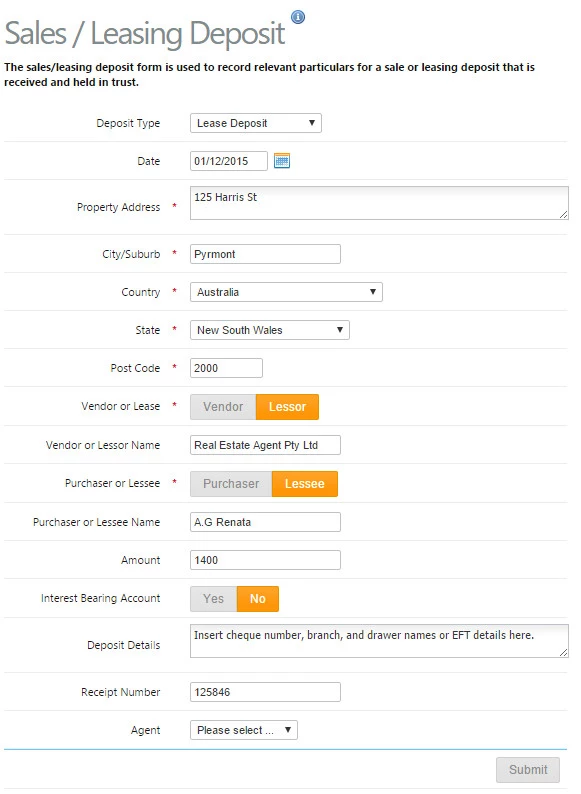
Was this article helpful?
That’s Great!
Thank you for your feedback
Sorry! We couldn't be helpful
Thank you for your feedback
Feedback sent
We appreciate your effort and will try to fix the article