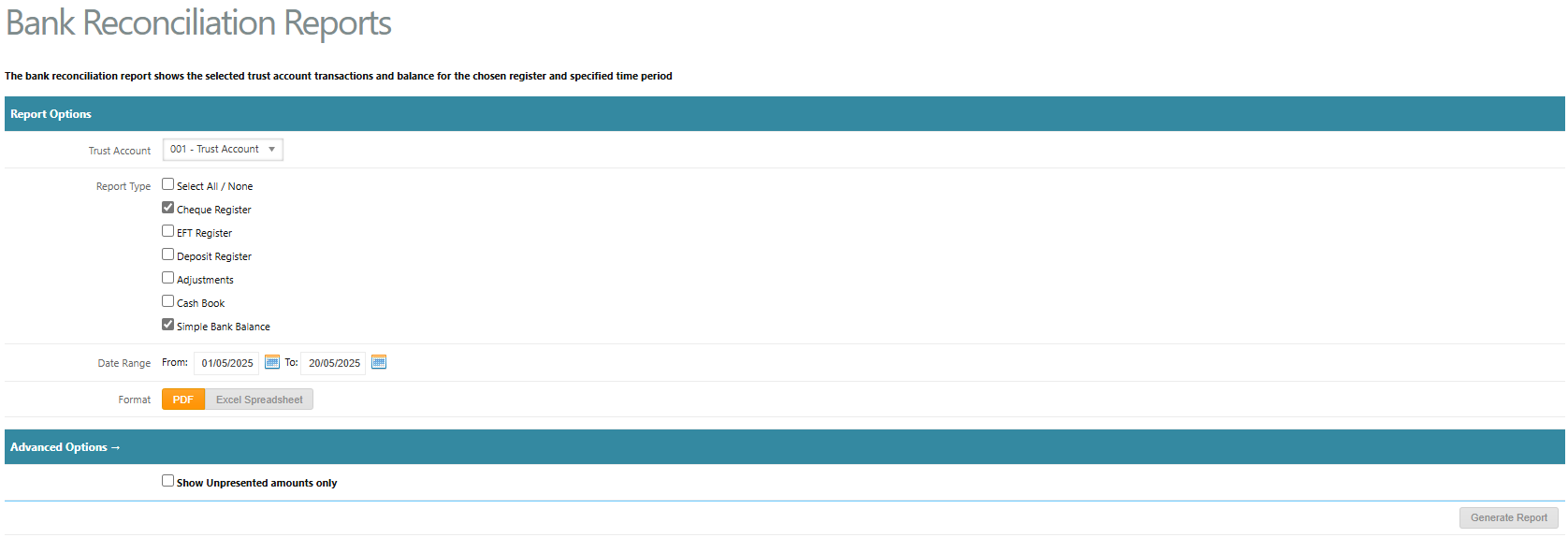
The Bank Reconciliation report shows the selected trust account transactions and balance for the chosen report type and specified time period. This can be generated by a Trust Accountant user only and is located under Bank Reconciliation > Bank Reconciliation Reports
To generate bank reconciliation reports, go to:
- Bank Reconciliation > Bank Reconciliation Reports
- Select the Trust Account from the drop-down menu
- Select one of the Report Types
- Cheque Register - generates a report displaying cheque payments made within the selected period
- EFT Register - generates a report displaying EFT & BPAY payments made within the selected period
- Deposit Register - generates a report displaying funds receipted within the selected period
- Adjustments - generates a report displaying all adjustments entered within the selected period
- Cash Book - generates the Cash Book report displaying all cash transactions for the selected trust account within the selected period
- Simple Bank Balance - generates a report showing the opening bank balance, receipts, payments, uncleared funds and closing bank balance for all properties in the trust account within the selection period
- Enter a Date Range
- Leave Show Unrepresented amounts only unticked to show all transactions. Tick Show Unpresented amounts only for Cheque Register to display unpresented Cheques and EFT Register to display unpresented EFT & BPAY payments
- Click Generate Report
Was this article helpful?
That’s Great!
Thank you for your feedback
Sorry! We couldn't be helpful
Thank you for your feedback
Feedback sent
We appreciate your effort and will try to fix the article