The Simple Daily Bank balance section allows users to generate a bank balance report which displays bank information on each property selected. The report produced will show the opening and closing bank balance, based on the date range selected above, any receipts/funds received, and payments made within the period. Uncleared funds will represent any cheques received that are yet to clear or funds marked with clearing dates.
Trust Accountant Location: Accounting Reports > Daily Bank Balance
Property Manager Location: Accounting Reports > Daily Bank Balance
Generate Simple Daily Bank Balance Report
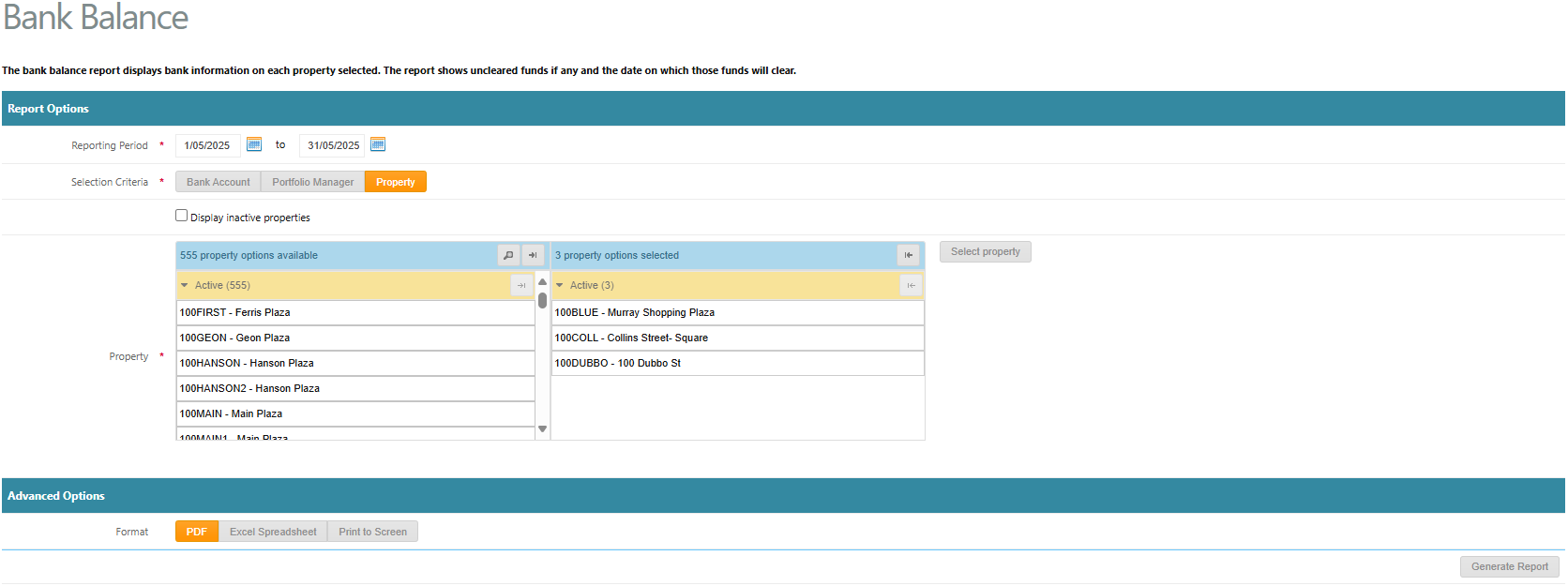
To generate the simple bank balance report, go to:
- Accounting Reports > Daily Bank Balance
- Select a Reporting Period as a From and To Date
- Choose a Selection Criteria as either Bank Account, Portfolio Manager or Property
- Display inactive properties: Select Yes or No
- Select a property, multiple properties or select all
- Select the format of the report as either PDF, Excel Spreadsheet or Print to Screen
- Click Generate Report

Was this article helpful?
That’s Great!
Thank you for your feedback
Sorry! We couldn't be helpful
Thank you for your feedback
Feedback sent
We appreciate your effort and will try to fix the article