The Aged Debtors Report lists debtors and outstanding debt for a specified period in time. This report runs by Transaction/Invoice Date, not Due Date, and will agree with the balances reflected on Owner Reports.
Trust Accountant Location: Accounting Reports > Aged Debtors
Property Manager Location: Accounting Reports > Aged Debtors
Generate Aged Debtors Report
To generate an aged debtors report, follow the below steps:
- Go to Accounting Reports > Aged Debtors
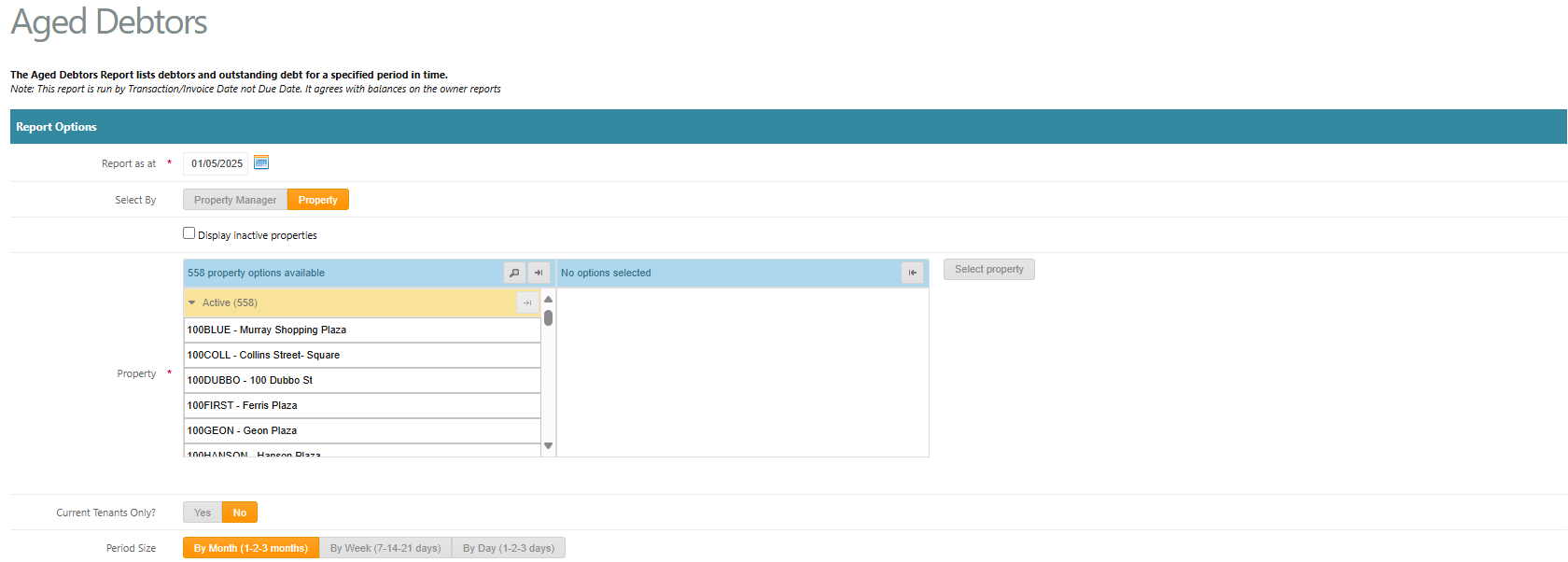
- Select the Report Options:
- Report as at - select the date you wish to report as at
- Select By - Select to filter by Property Manager or Property
- Select the portfolio and properties you wish to report on
- Period Size - select the period ranges e.g. By Month, By Week, By Day
- Select Advanced Options:
- Account Options - select to display All Accounts, Account Range or selected Multiple Codes
- Format - select PDF or Excel Spreadsheet to choose the format the report is generated as
- Exclude Bad Debts - Select Yes or No. This will exclude tenants marked with a Bad Debt Provision
- Show Tenants in credit - select Yes or No. Selecting Yes will display tenants in a credit position on their account
- Exclude Zero Balances - select Yes or No. Selecting Yes will generate the report with all leases that currently have zero owing on their account
- Click Generate Report
- A link will appear at the top of the screen to download the report

Was this article helpful?
That’s Great!
Thank you for your feedback
Sorry! We couldn't be helpful
Thank you for your feedback
Feedback sent
We appreciate your effort and will try to fix the article