What is accrual accounting?
Accrual accounting is an accounting method that recognises income in the period in which it is earned, but not necessarily when cash is received. Similarly, expenses are recognised in the period in which expenses are incurred rather than when invoices are paid.
How does Cirrus8 handle accrual properties?
Cirrus8 has a fully integrated, in-built General Ledger that posts transactions on an accruals basis as tenant and supplier invoices are entered into the system. At the end of each month, an additional process must be undertaken by the Property Manager and/or Trust Account to account for any accruals and prepayments.
Accrued Expenses: expenses that will be recognised and recorded via a general ledger journal entry as they are incurred and before invoices are received and entered into Cirrus8 (manual journal required)
Accrued Income: income that will be recognised and recorded via a general ledger journal entry when it has been earned and before tenant invoices are raised (manual journal required)
Prepaid Expenses: expenses that have been recognised in advance and requires a general ledger journal entry to apportion the expense over the periods it relates to (Cirrus8 calculated journal to be posted)
Prepaid Income: income that has been recognised in advance and requires a general ledger journal entry to apportion the income over the periods it relates to (Cirrus8 calculated journal to be posted)
Financial Periods:
Australian companies typically run their accounts based on the Financial Year, being July - June however some companies will run their accounts based on the Calendar Year, being January - December. It is imperative that properties are set up to run on the correct calendar, based on the Owner Company's accounting requirements, when setting up the property in Cirrus8. This will ensure transactions are posted to the correct period.
FINANCIAL YEAR | CALENDAR YEAR |
|---|---|
Period 1 : July | Period 1 : January |
Period 2: August | Period 2 : February |
Period 3 : September | Period 3 : March |
Period 4 : October | Period 4 : April |
Period 5 : November | Period 5: May |
Period 6 : December | Period 6 : June |
Period 7 : January | Period 7 : July |
Period 8 : February | Period 8 : August |
Period 9 : March | Period 9 : September |
Period 10 : April | Period 10 : October |
Period 11 : May | Period 11 : November |
Period 12: June | Period 12 : December |
Please note that all transaction examples provided below will be on a Financial Year basis.
How is income recognised in Cirrus8 on an accruals basis?
There are two types of tenant invoices raised in Cirrus8:
Standing Charges: The standing charges process is undertaken monthly to raise recurring lease charges to tenants such as Rent and Variable Outgoings. Standing charges are generally raised with invoices issued to tenants mid-month for charges related to the following month.
When raised in Cirrus8, the transaction date will default to the ‘From Date’ of charges being raised e.g. rent raised for the calendar month of July 2024 will have a transaction date of 01/07/2024 and therefore the system will post the income to the relevant period based on the transaction date. July 2024 rent will be posted to Period 1 of Financial Year 2025. As this income is automatically posted to the correct period, no general ledger journals are required to adjust this.
Ad-Hoc Invoices: Ad-hoc invoices are raised to tenants sporadically as and when expenses need to be recovered directly from the tenant. These can be transactions raised immediately and sent to tenants via an interim invoice, or transactions can be raised in advance for future dated expenses such as council rates. When raising ad-hoc invoices, users manually choose the transaction date for the invoices raised and income will be posted to the period based on the transaction date used to raise the invoice. As some invoices will be raised in advance (e.g. Council rates for the period January - March are raised within one invoice), we need to use the system to create a general journal entry to split this income to be recognised in the correct periods. See instructions below under Prepaid Income Journals.
You are only able to post income into the current period or a future period therefore if the current period is March 2024, you will only be able to raise tenant invoices dated 01/03/2024 onwards.
Accrual accounting entries:
Invoice entry:
| DR | CR | |
| Rent | $1,000.00 | |
| GST | $100.00 | |
| Debtors | $1,100.00 |
Payment Received:
| DR | CR | |
| Bank | $1,100.00 | |
| Debtors | $1,100.00 |
How are expenses recognised in Cirrus8 on an accruals basis?
Similar to income, expenses are posted to a period in Cirrus8 based on the transaction date used for the invoice entry. If the invoice date of the supplier invoice is within the current month or a future month, the transaction will be posted to the relevant period. If an invoice is received late and the invoice date is within a closed period, the invoice entry method remains the same however the transaction will be posted to the current open period - for example if an invoice dated 15th July 2024 is only received on the 10th August 2024, the invoice can be dated 15/07/2024 however will only be posted to Period 2 of the financial year as Period 1 has already been closed off. In this case, a manual general ledger journal entry should have been posted in July 2024 to accrue for this cost… more on that later!
If an expense is relevant to that month only, such as a one off repairs and maintenance job undertaken within the month, this expense will be posted to that period based on the transaction date. If an expense relates in part to a future period, we need to use the system to create a general journal entry to split this expense to be recognised in the correct periods. See instructions below under Prepaid Expense Journals.
Accrual accounting entries:
Invoice entry:
| DR | CR | |
| R&M | $1,000.00 | |
| GST | $100.00 | |
| Creditors | $1,100.00 |
Payment Made:
| DR | CR | |
| Bank | $1,100.00 | |
| Creditors | $1,100.00 |
End Of Month General Ledger Journals
Once all cash transactions have been processed for the relevant month, a series of general ledger journals will be required to ensure all income and expenses are accurately accounted for on an accruals basis.
Accrued Expenses
Expenses should be accrued when services have been approved and/or provided but you have not yet received an invoice for the service. Users should refer to CirrusFM and work orders raised to identify expenses that require accruing. If not utilising CirrusFM, an internal company procedure will need to be put in place to track these expenses.
If an invoice has been received and entered into Cirrus8, you do not need to process a general ledger journal for the expense, regardless of whether it has been paid or not.
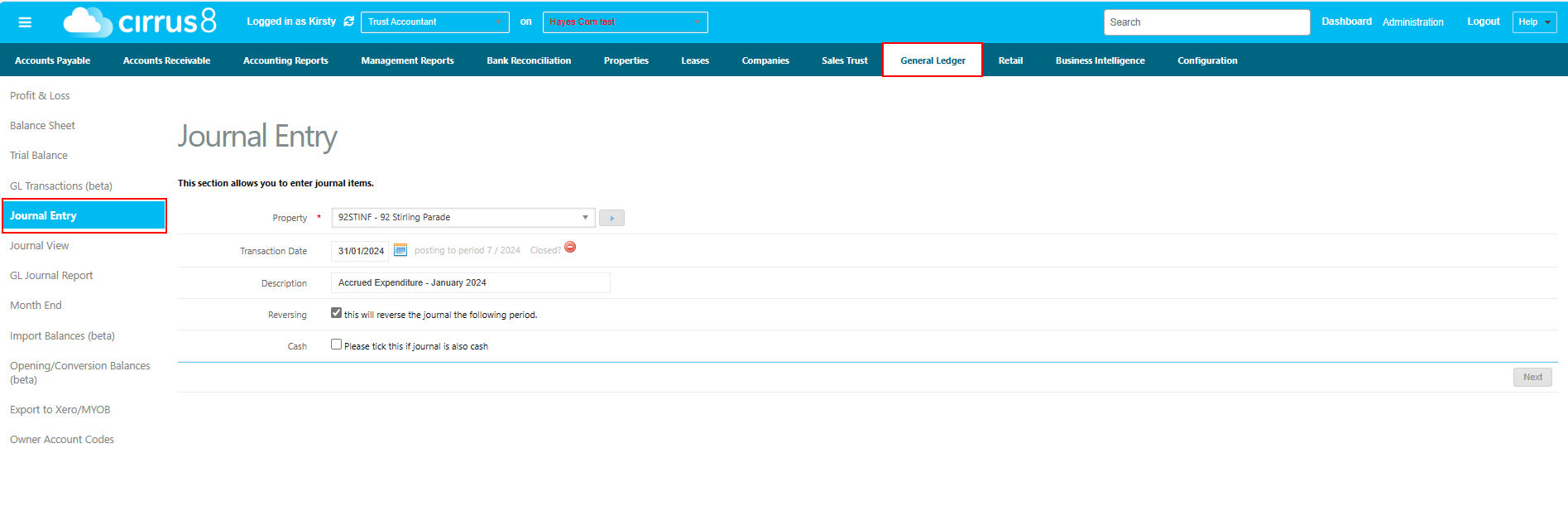
Navigate to General Ledger > Journal Entry & enter the Property, Transaction Date (should be the last day of the period), Description & ensure this is done as a Reversing journal - this is very important.
By selecting ‘Reversing’ as an option, the journal will automatically reverse on the 1st of the following month, as you are likely to receive the invoice for which the accrual relates to and should offset the reversing entry.
In the following screen, enter a line item for each expense to be accrued as a debit (positive amount) allocating each expense to the relevant supplier company. Once all expense line items have been entered, add a balancing line item as a credit (negative amount) to the Accrued Expenses account code using MISC as the company:
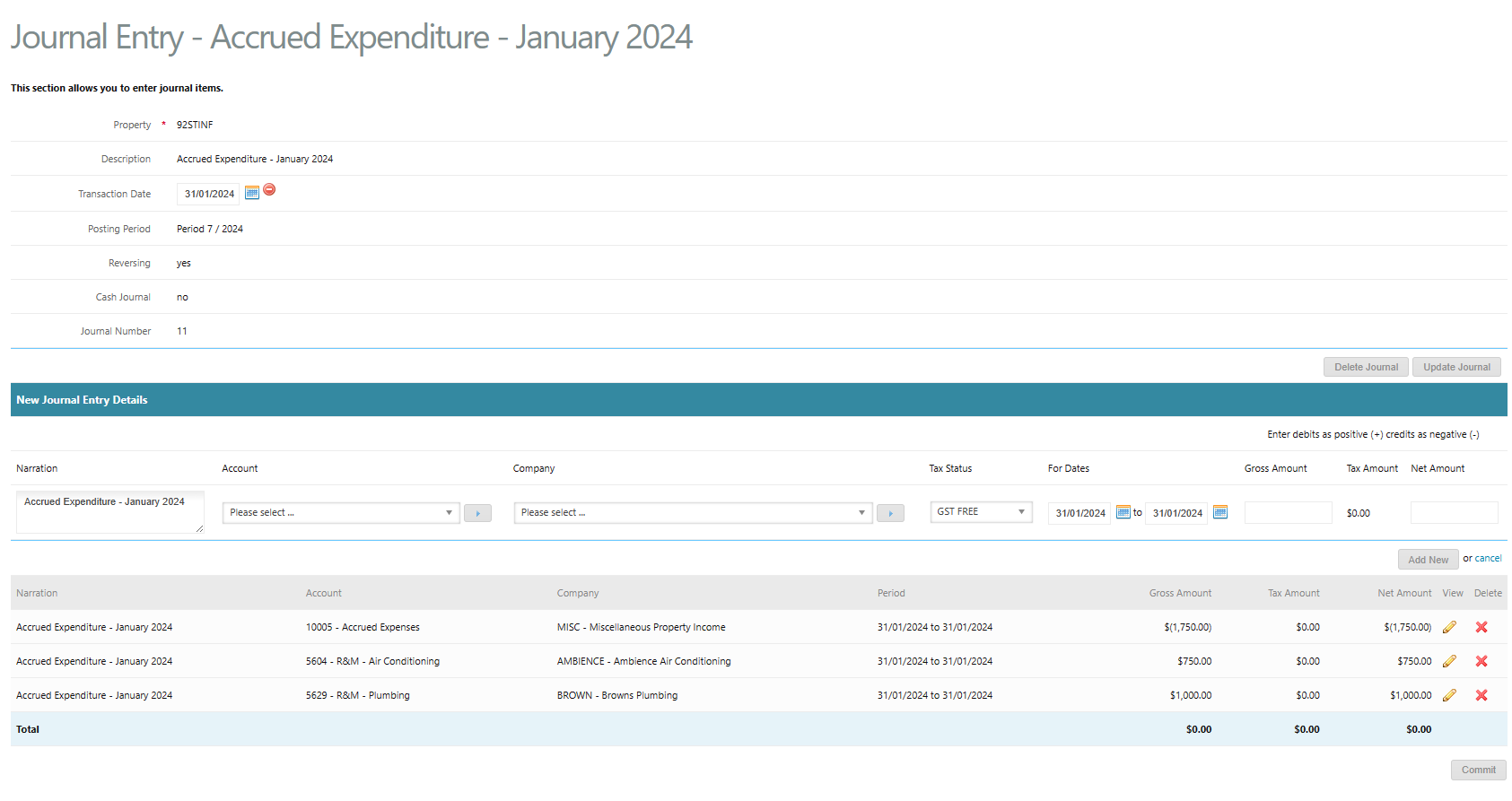
The journal must balance (Debits + Credits = $0.00) before you are able to commit the journal.
This journal will auto reverse the following month and if you receive and enter the invoices related to these expenses, this will offset the reversing journal. If invoices have not been received, you will need to continue accruing the expense each month until the relevant invoice is received and entered into Cirrus8.
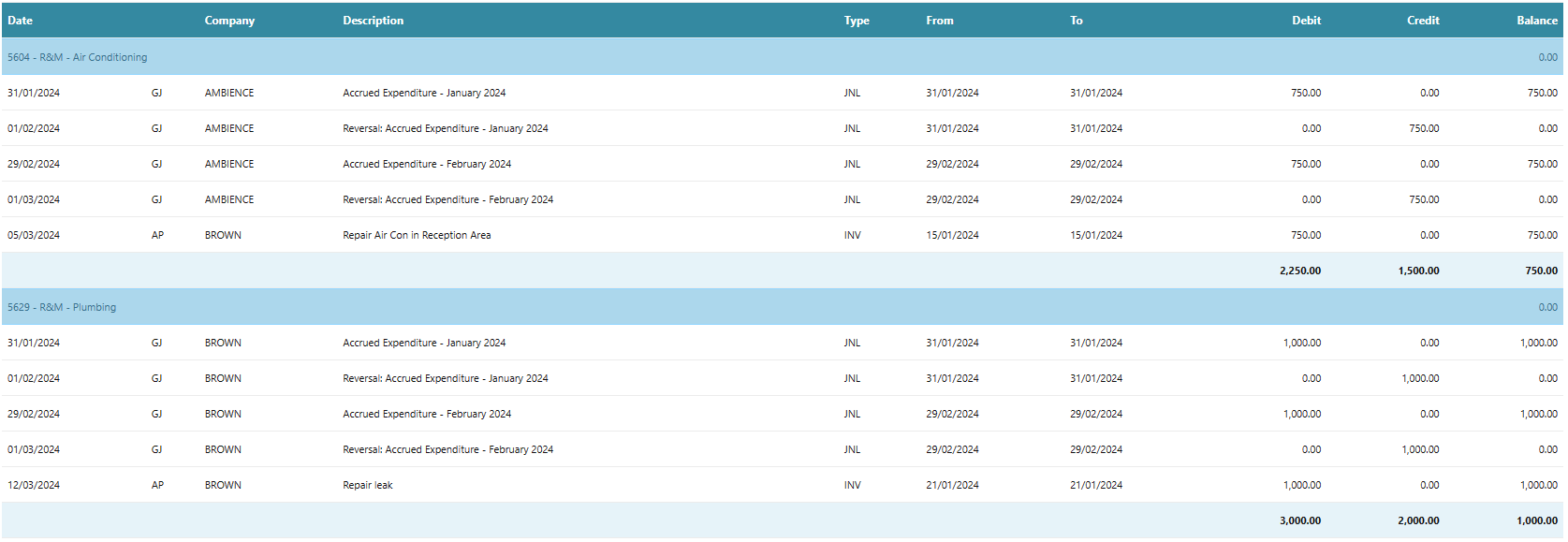
The below transactions show the end result of the above example when accrued again the following month, then an invoice received and entered the month after. The expense balance is correct, with the expense reflected in January 2024 and the accrued expenses account balance is $0.00

Accrued Income
Similar to expenses, income should be accrued when the tenant is due to be charged however an invoice has not been raised. This would typically be in line with accrued expenses whereby you are waiting on the contractor invoice to on-charge the expense to the tenant.
If an invoice has been raised and issued to the tenant via Cirrus8, you do not need to process a general ledger journal for the income, regardless of whether the tenant has paid this invoice or not.
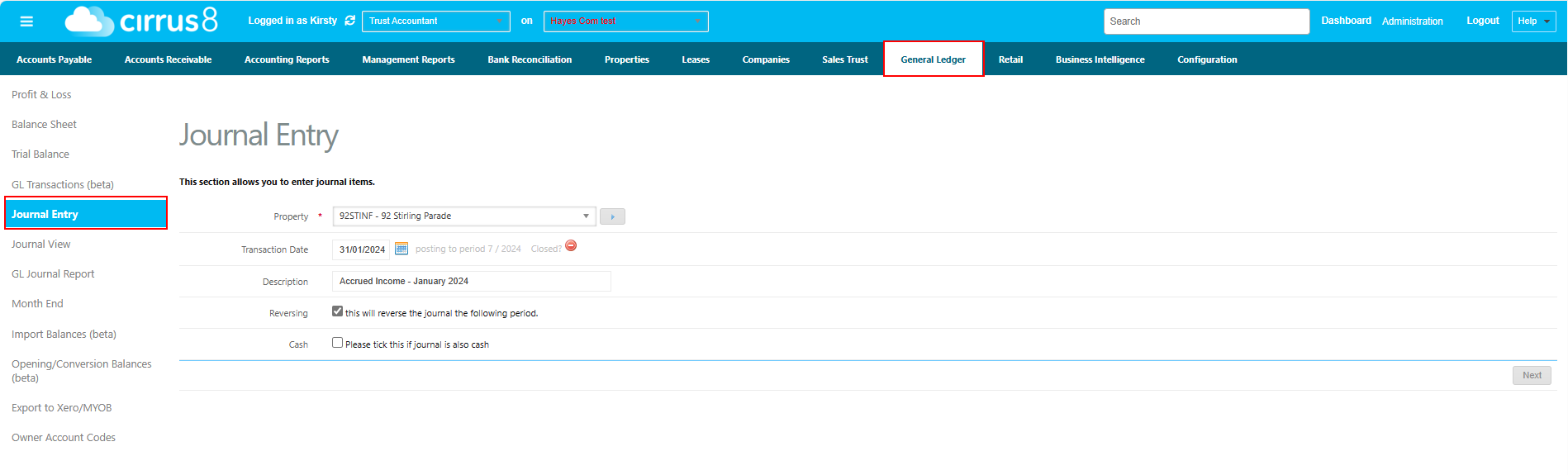
Navigate to General Ledger > Journal Entry & enter the Property, Transaction Date (should be the last day of the period), Description & ensure this is done as a Reversing journal - this is very important.
By selecting ‘Reversing’ as an option, the journal will automatically reverse on the 1st of the following month, as you are likely to raise the tenant invoice for which the accrual relates to and should offset the reversing entry.
In the following screen, enter a line item for each income item to be accrued as a credit (negative amount) allocating each income item to the MISC company. Once all income line items have been entered, add a balancing line item as a debit (positive amount) to the Accrued Income account code using MISC as the company:
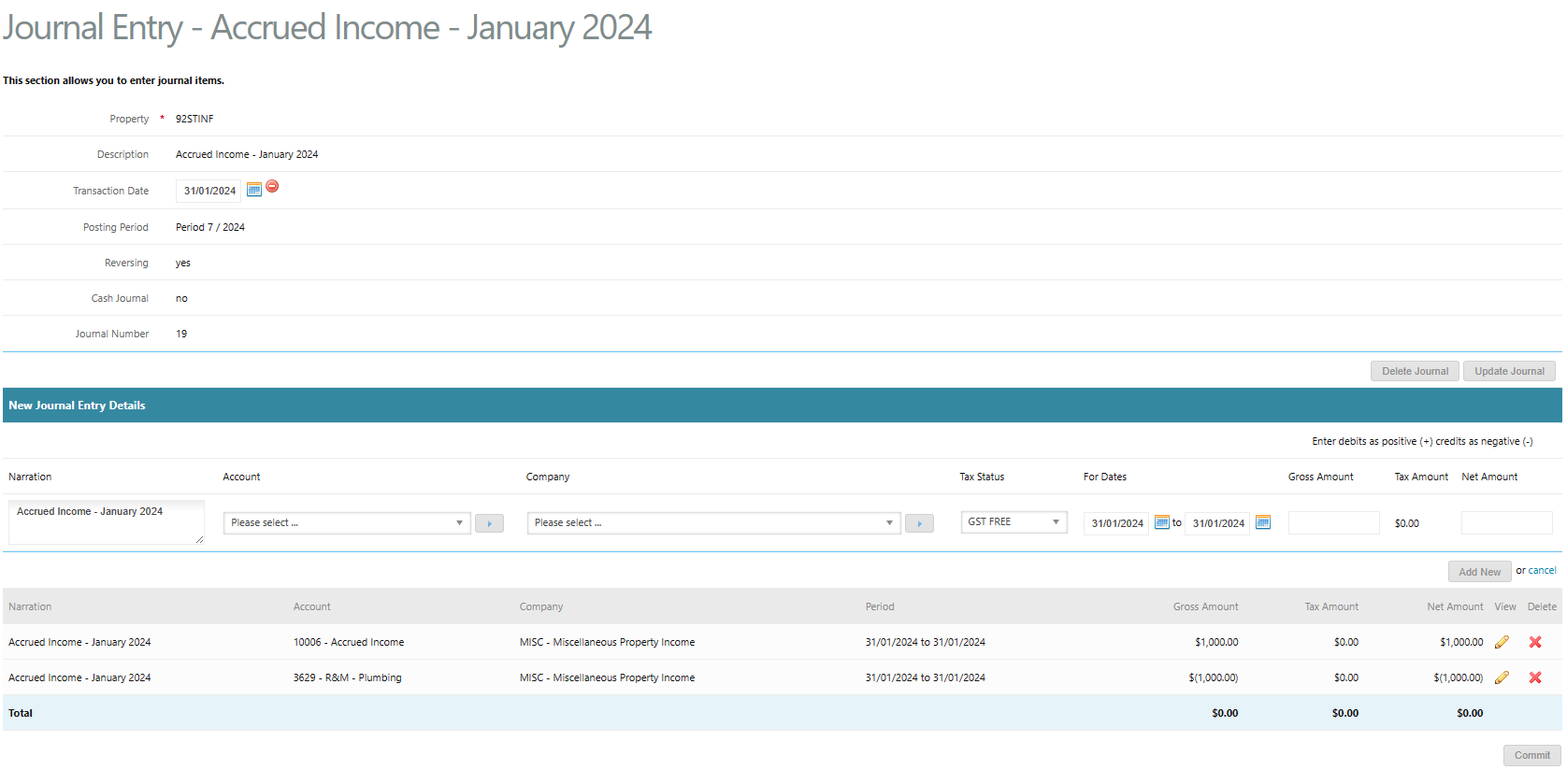
The journal must balance (Debits + Credits = $0.00) before you are able to commit the journal.
This journal will auto reverse the following month and if you invoice the tenant, this will offset the reversing journal. If an invoice is not raised, you will need to continue accruing the income each month until the relevant invoice is raised to the tenant in Cirrus8.
The below transactions show the end result of the above example when accrued again the following month, then an invoice raised the month after. The income balance is correct, with the income reflected in January 2024 and the accrued income account balance is $0.00


Prepaid Expenses
Cirrus8 will calculate any prepaid expenses based on transactions entered in the system and the from & to dates used for each transaction. Users will simply need to initiate and post the journal at the end of each month.
We will use Council Rates as an example as these are generally paid on a quarterly basis. The below AP invoice entry shows the 3rd instalment entered as one invoice dated 01/01/2024 and posted to Period 7 of 2024 however the invoice relates to the period 01/01/2024 - 31/03/2024:
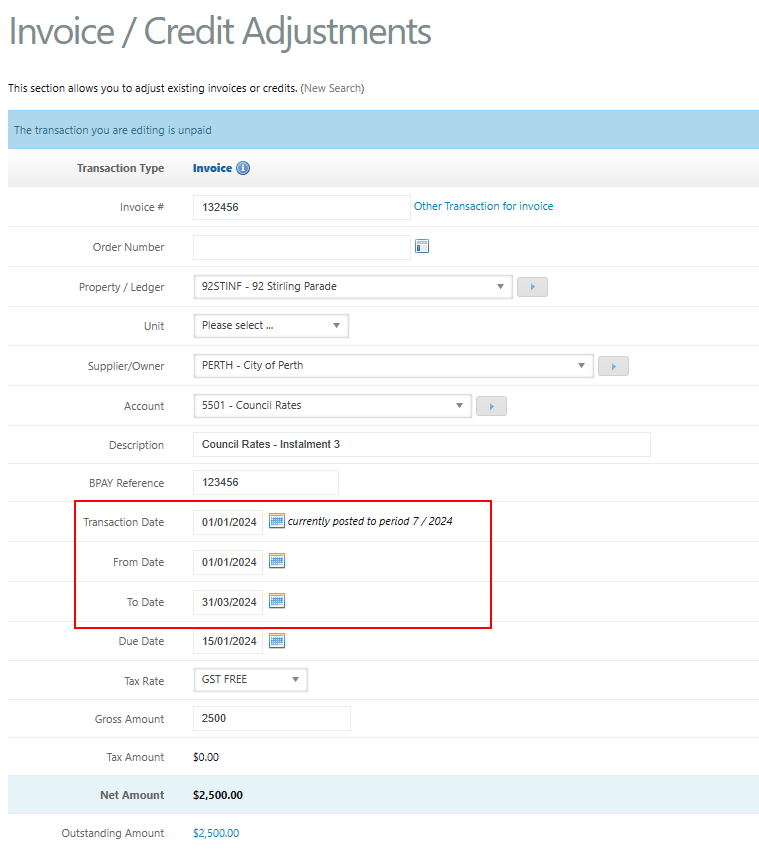
As this expense has currently been posted in full to Period 7 (January 2024), we will need to use Cirrus8 to split this expense over January, February and March of 2024.
Navigate to General Ledger > Month End & select Expenditure as the Account Group. The period will default to the current open period and you will be presented with a list of properties that have expenses posted to this period which relate to a future period. Select your accrual properties only and click ‘Process’:
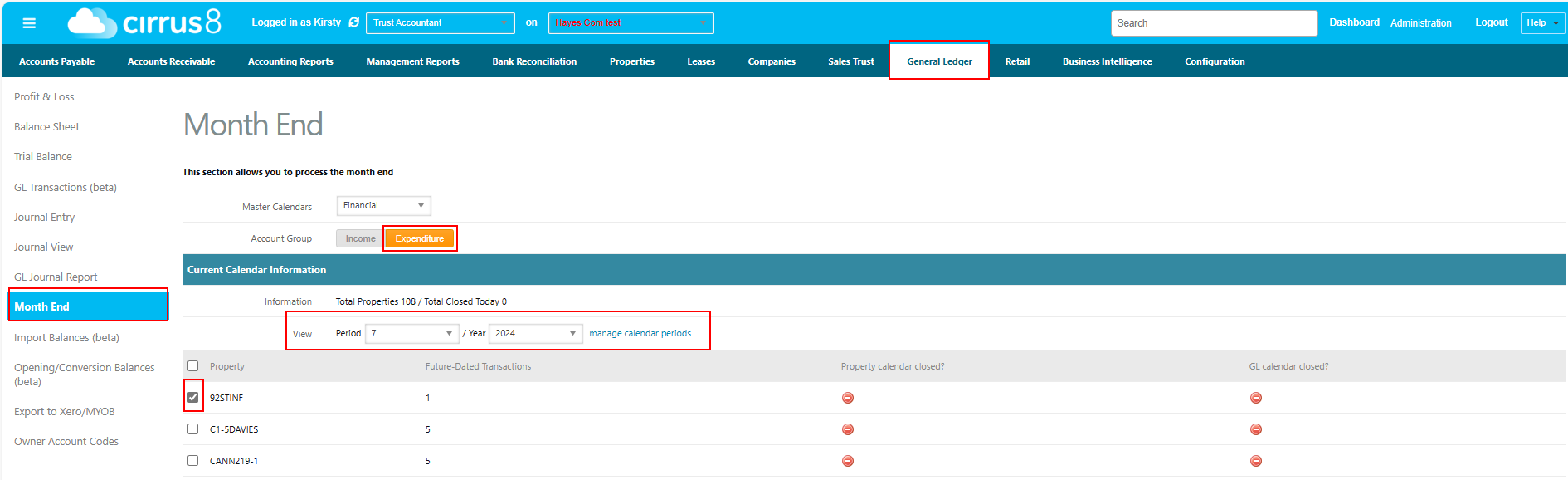
This will create a draft journal in the next screen that you can select to view in order to check the detail and post the journal:
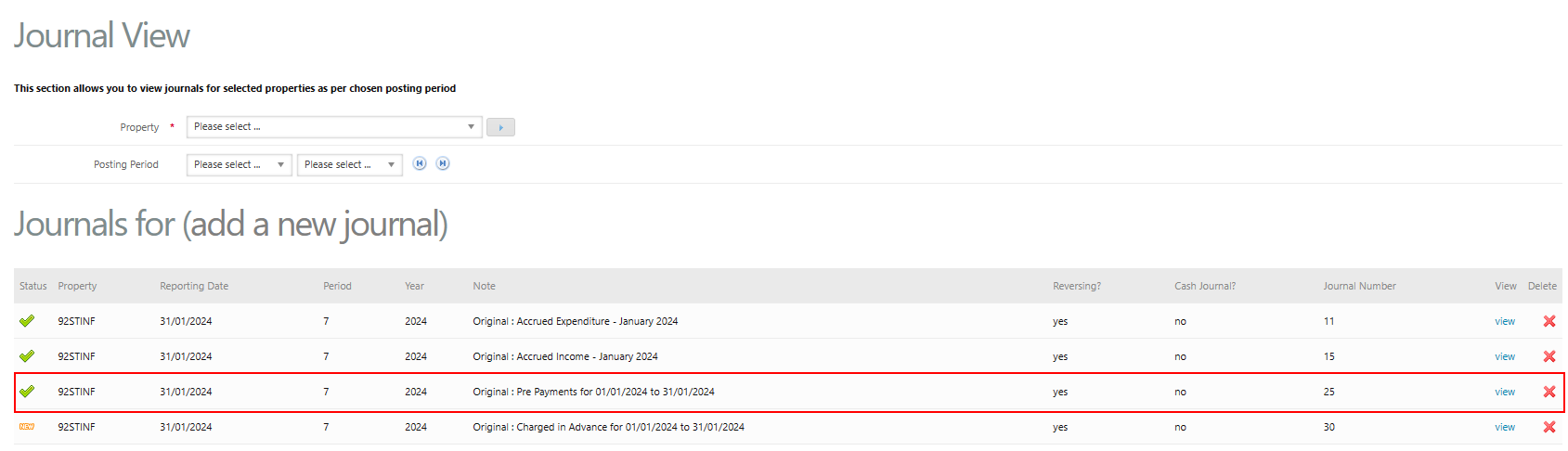
The journal will calculate the portion of the expense relating to a future period and will credit the Expense and debit Future Period Costs. The calculation for the below journal is as follows:
$2,500.00 / 91 days x 60 days future period = $1,648.35.
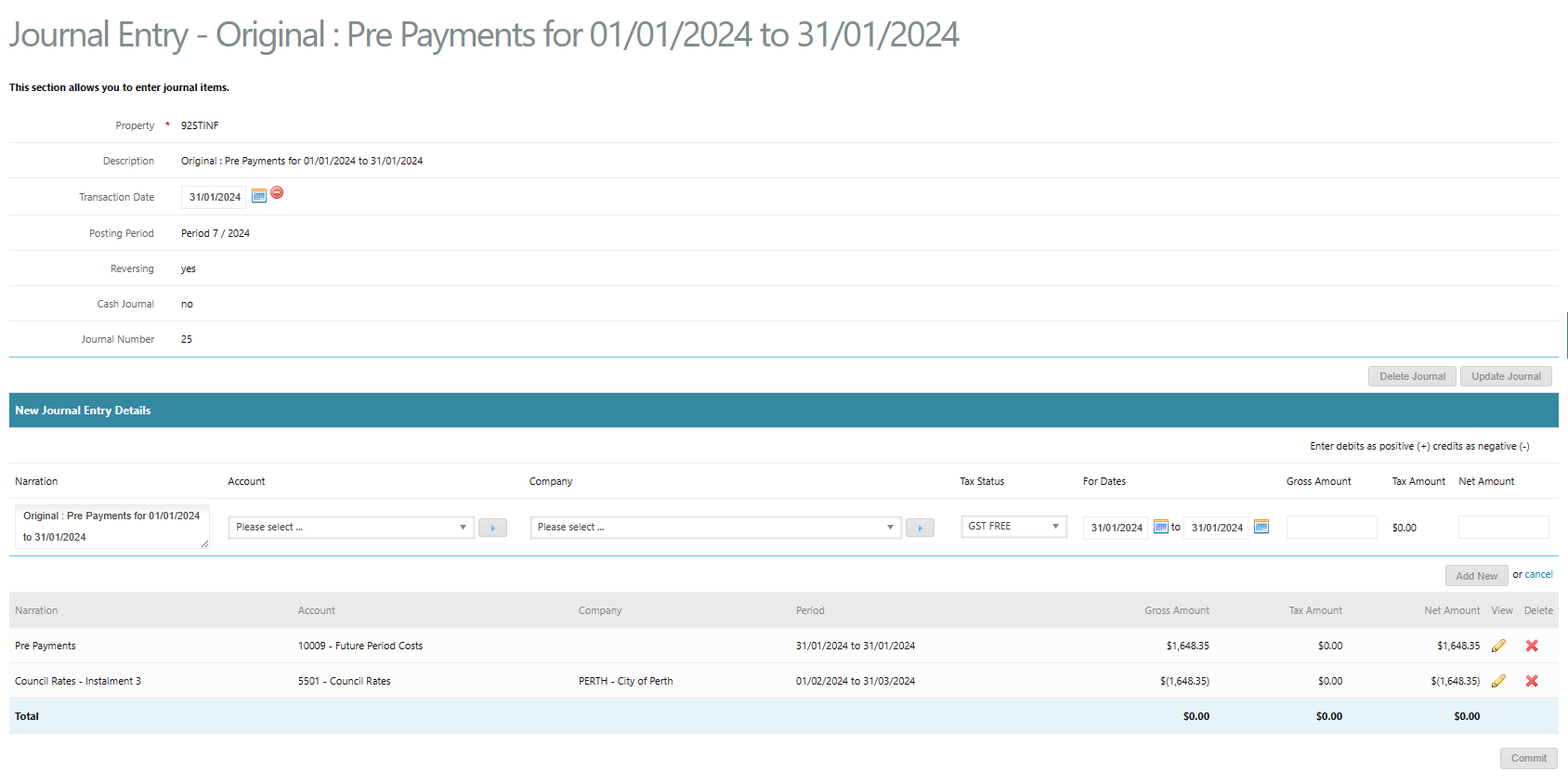
By committing this journal and repeating this process in February 2024, this will result in the below general ledger transactions and the Council Rates expense reflected in the correct months and the Future Period Costs balance back to $0.00:


The accruals profit and loss & trial balance reports will reflect the Council Rates split amongst January, February & March based on the number of days in each month:
| Month | Amount |
| January 2024 (31 days) | $851.65 |
| February 2024 (29 days) | $796.71 |
| March 2024 (31 days) | $851.64 |
| TOTAL | $2,500.00 |
Prepaid Income (Tenants charged in Advance)
Similarly to expenses, Cirrus8 will calculate any prepaid income based on transactions entered in the system and the from & to dates used for each transaction. Users will simply need to initiate and post the journal at the end of each month.
We will again use Council Rates as an example as these are generally on-charged on a quarterly basis. The below AR invoice entry shows the 3rd instalment entered as one invoice dated 01/01/2024 and posted to Period 7 of 2024 however the invoice relates to the period 01/01/2024 - 31/03/2024:
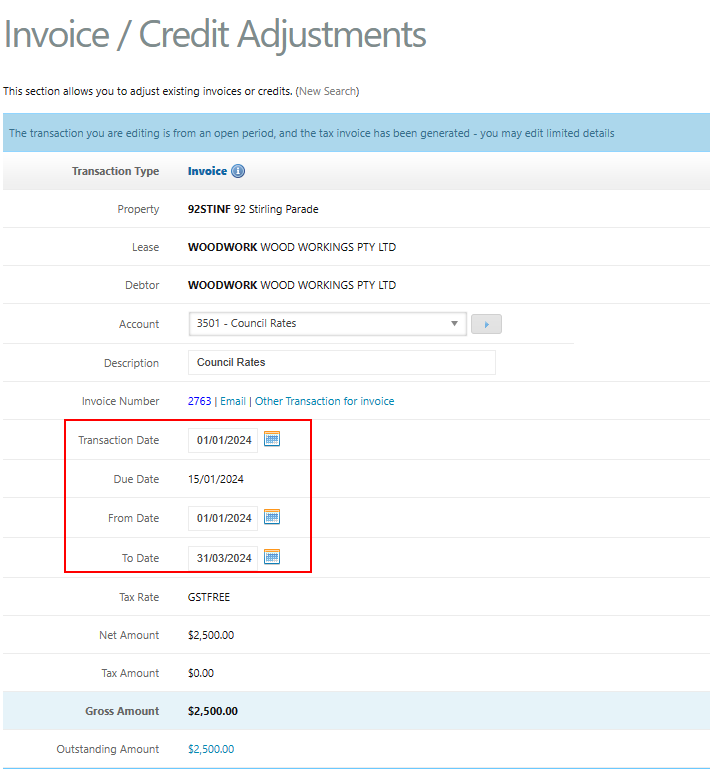
As this income has currently been posted in full to Period 7 (January 2024), we will need to use Cirrus8 to split this income over January, February and March of 2024.
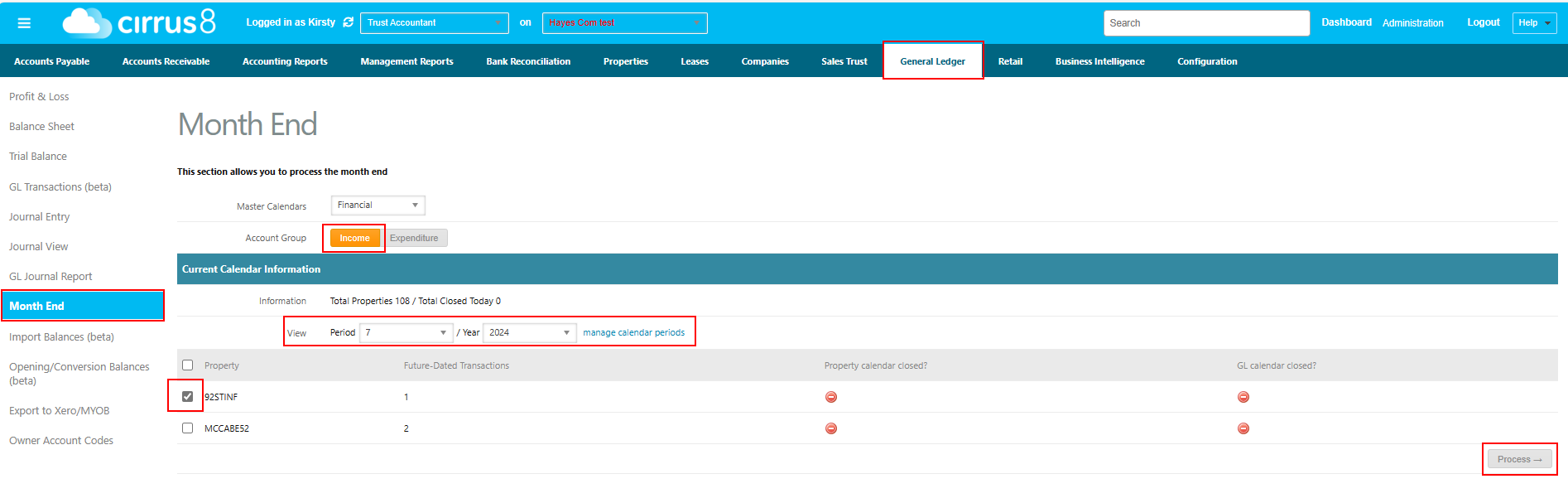
Navigate to General Ledger > Month End & select Income as the Account Group. The period will default to the current open period and you will be presented with a list of properties that have income posted to this period which relates to a future period. Select your accrual properties only and click ‘Process’:
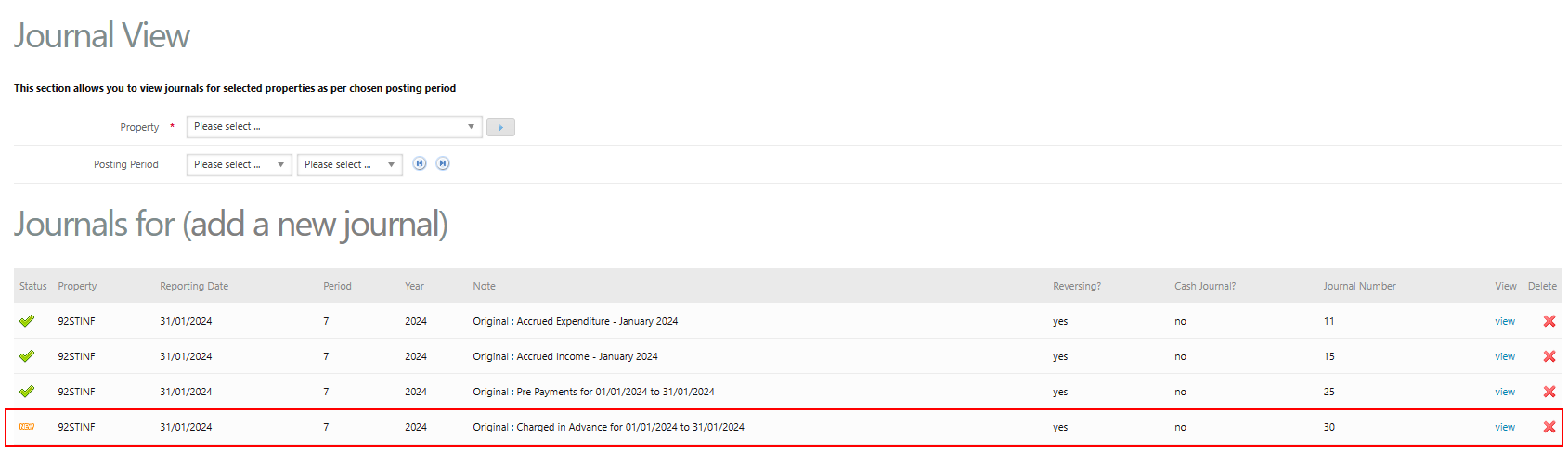
This will create a draft journal in the next screen that you can select to view in order to check the detail and post the journal:
The journal will calculate the portion of income relating to a future period and will debit Income and credit Charged in Advance. The calculation for the below journal is as follows:
$2,500.00 / 91 days x 60 days future period = $1,648.35.
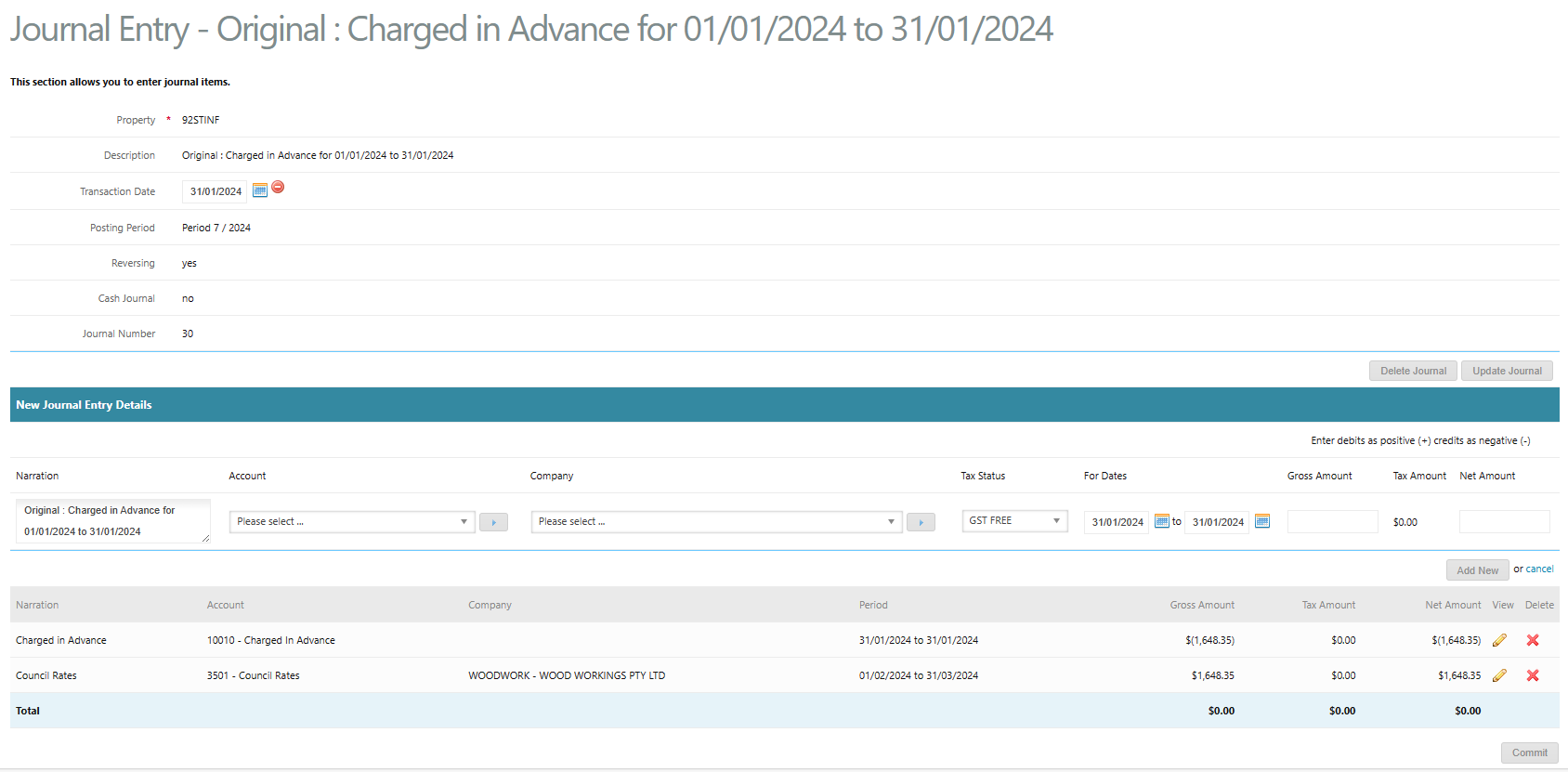
By committing this journal and repeating this process in February 2024, this will result in the below general ledger transactions and the Council Rates income reflected in the correct months and the Charged in Advance balance back to $0.00:


The accruals Profit and Loss & Trial Balance reports will reflect the Council Rates income split amongst January, February & March based on the number of days in each month:
| Month | Amount |
| January 2024 (31 days) | $851.65 |
| February 2024 (29 days) | $796.71 |
| March 2024 (31 days) | $851.64 |
| TOTAL | $2,500.00 |
Please contact support@cirrus8.com.au if you have any further queries on this information or contact training@cirrus8.com.au if you would like to book in a training session to run through the process in full with one of our trainers. Training will be charged at the standard rate of $220.00 + GST per hour.
Was this article helpful?
That’s Great!
Thank you for your feedback
Sorry! We couldn't be helpful
Thank you for your feedback
Feedback sent
We appreciate your effort and will try to fix the article