The chart of accounts is central to any accounting system. Each transaction gets allocated account codes, then depending of which category the account code falls determines where the transaction appears on reports.
Account group
The account group is the major group an account falls within.
NB. The owner reports look at the account group an account falls within to determine where the transaction appears in the owners report. Major groups line up with the reporting categories on the owners statement.
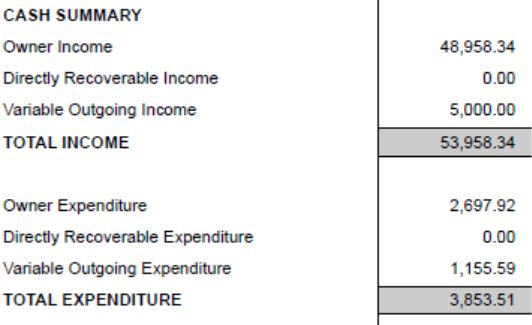

Major groups are:
owners income
variable outgoings income
directly recoverable income
owners expenditure
variable outgoings expenditure
directly recoverable expenditure
Ranges of accounts are set up for each account group. Some groups have multiple ranges set up as below
The other categories of Distributions – for distribution of profit/cash to owners/investors and balance sheet accounts.
Control accounts
A control account is a main account which has a subsidiary ledger that supports it. e.g. the debtors control account has the tenant ledgers which support it.
NB. The balances of all the subsidiary accounts should add up to the balance of the control account. If the two are not in balance it is important to investigate and resolve, although any good accounting system should not allow this to occur.
Control accounts (cirrus8 default) are:
10000 bank – used for all cashbook transactions
10001 debtors – used for all tenant transactions
10002 creditors – used for all supplier transactions
10003 GST output tax – for GST on revenue
10004 GST input tax – for GST on expenses
10005 accrued expenses
10006 accrued income
10007 retained earnings current year
10008 retained earnings prior years
10009 future period costs – used for month end journals for prepaid expenses
10010 charged in advance – used for month end journals for income charged in advance
Balance sheet accounts
The balance sheet accounts are any accounts that are not income or expense accounts which appear on the balance sheet.
GL Account groups
There are Major GL Account groups and Sub-groups. The allocation of these determines where an account appears in the general ledger reports – trial balance, profit and loss and balance sheet. The sub-groups depend upon the major group. Groups and sub-groups are:
Balance sheet – assets - bank
Balance sheet – assets – fixed assets
Balance sheet – assets – current assets
Balance sheet – assets – non current assets
Balance sheet – liabilities – current liabilities
Balance sheet – liabilities – non current liabilities
Balance sheet – equity – share capital
Balance sheet – equity – Retained earnings
Income – owners income
Income – directly recoverable income
Income – variable outgoings income
Expenses – owners expenditure
Expenses – variable outgoings expenditure
Expenses – recoverable expenditure
Viewing, Adding & Deleting account codes
Chart of Accounts (Report), under Management reports.
To view the full chart of accounts, on screen, PDF or Excel.
Chart of Accounts (Maintenance), under Configuration.
To view, amend and delete existing accounts and add new accounts.
Viewing Accounts
Click ‘existing account’ scroll through the list of account codes or type the code (or code name) and the smart search feature will look for accounts with those letter/number sequences.
Select any account code for viewing.
Deleting Accounts
Click 'Existing accounts' then 'Delete this account'. The system does a validation to check if an account has been used before deletion.
Adding Accounts
Click 'New Account' select an account group.
A list of account ranges are shown,
Enter an available account code or click on a range to populate the next available account code.
enter an account name and default GST code.
Was this article helpful?
That’s Great!
Thank you for your feedback
Sorry! We couldn't be helpful
Thank you for your feedback
Feedback sent
We appreciate your effort and will try to fix the article