Tenants may occasionally overpay an invoice or rent amount, resulting in unallocated funds. In some cases, there may be no invoices outstanding on the tenants account to apply the payment against, or it may be unclear which invoice the funds should be allocated to.
Create Receipt
To create a credit receipt for unallocated funds, go to:
- Accounts Receivable > Receipts
- Select a search method e.g. Lease
- Select Payment Type and complete the Payment Details section - for further details on this please refer to Create Receipts
- Enter the Amount as per the bank statement
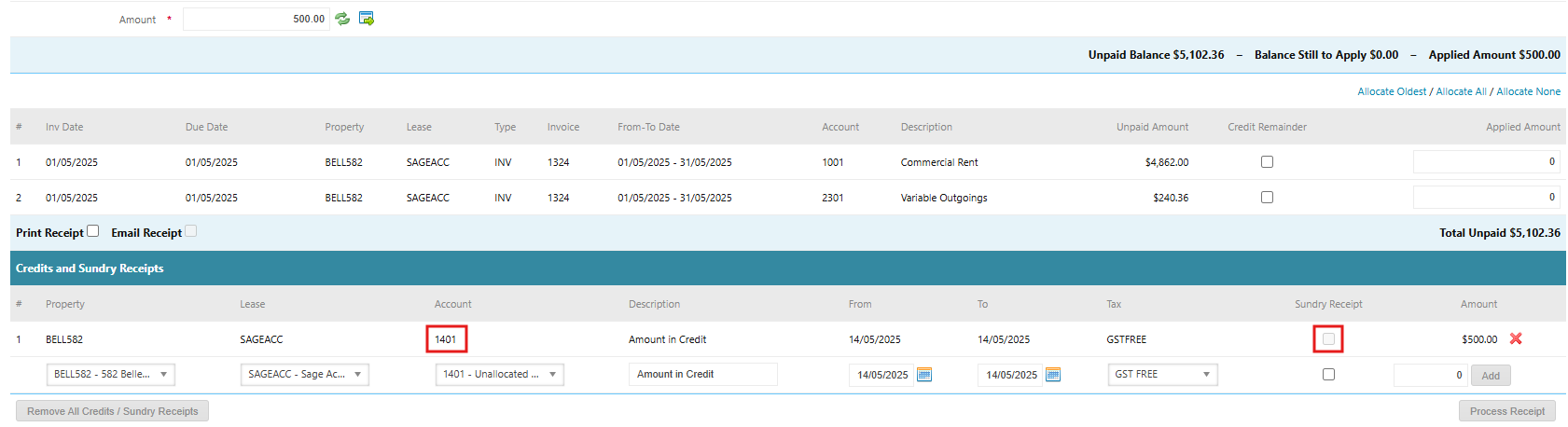
- Click Add Credit / Sundry Receipt. This will populate a Credits and Sundry Receipts entry line.
- Confirm that the Property and Lease selected are correct
- Select the Account that has been configured in your database as the Unallocated Cash account e.g. 1401 Unallocated Cash.
- Enter a Description e.g. Amount in Credit
- Keep the From and To dates as is. This will default to the Receipt Date.
- Keep the Tax rate as GST Free
- Leave Sundry Receipt unticked
- Enter the amount of the credit
- Click Add
- Click Process Receipt
To allocate these credit funds to a tenant invoice at a later stage, a zero receipt will need to be created. Please refer to the article Zero Receipts.
Was this article helpful?
That’s Great!
Thank you for your feedback
Sorry! We couldn't be helpful
Thank you for your feedback
Feedback sent
We appreciate your effort and will try to fix the article