Part 1: Set Up the Strata Owner.
Create the owner record before creating the property.
Enter the Company Name in the format:
“The Owners of [Property Address] / SP[Strata Plan Number]”Set Tax Status:
Select GST only if the strata entity is registered for GST.
Leave GST off if not registered.

Part 2: Set Up the Strata Property
Create a new property record.
Enter the Property Code and Name using the strata plan number:
Example:Code: SP13584
Name: Strata Plan 13584
Tick or flag the property as Strata.
This ensures invoices use the correct terminology (e.g., “manage property”).
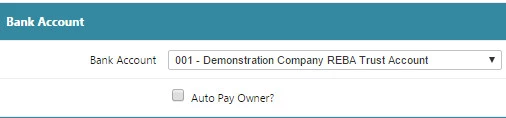
Ensure Auto Pay Owner remains unticked (off).
Part 3: Raising Strata Levy Invoices
Strata levies are typically raised quarterly.
Use the following accounts:
0118 – Strata levies (administration fund)
0116 – Reserve fund
Issue invoices to the owners.
Owners pay these invoices so the strata entity can meet upcoming expenses.
Part 4: When an Owner Wants Tenancy Income to Cover Levies
If an owner leases their unit and wants rent funds used to pay strata levies:
Step 1: Set Up the Unit Normally
Set up the individual unit as a managed property.
Set up the tenant and lease as usual.
Step 2: Tenant Charges
Tenant charges usually include:
Rent
Variable outgoings
Step 3: Enter the Strata Levy as a Payable
Instead of the owner paying directly:
Enter the levy invoice as an Accounts Payable invoice to the managed unit.
Use:
Variable outgoings code: 6415
Supplier code: Linked to the trust account
Example: REAGENT_TR – Real Estate Agent Trust Account
Step 4: Payment and Internal Transfer
When the invoice is paid:
Receipt the amount into the strata entity owner’s account.
This is effectively:
An internal transfer
Within the same bank account
No physical transfer of funds is required.
Quick Checklist
Setup Order
Create Owner
Create Strata Property
Raise Levy Invoices
Handle payments or tenancy-funded levies
Key Codes
0118 – Strata levies
0116 – Reserve fund
6415 – Variable outgoings (levies paid via managed unit)
Was this article helpful?
That’s Great!
Thank you for your feedback
Sorry! We couldn't be helpful
Thank you for your feedback
Feedback sent
We appreciate your effort and will try to fix the article