This section allows users to view previously generated lease tax invoices and statements, link supporting supplier documents, and check the email status of invoices issued to tenants.
Accessing View Tax Invoices
Trust Accountant:
Accounts Receivable > View Tax InvoicesProperty Manager:
Leases > View Tax Invoices
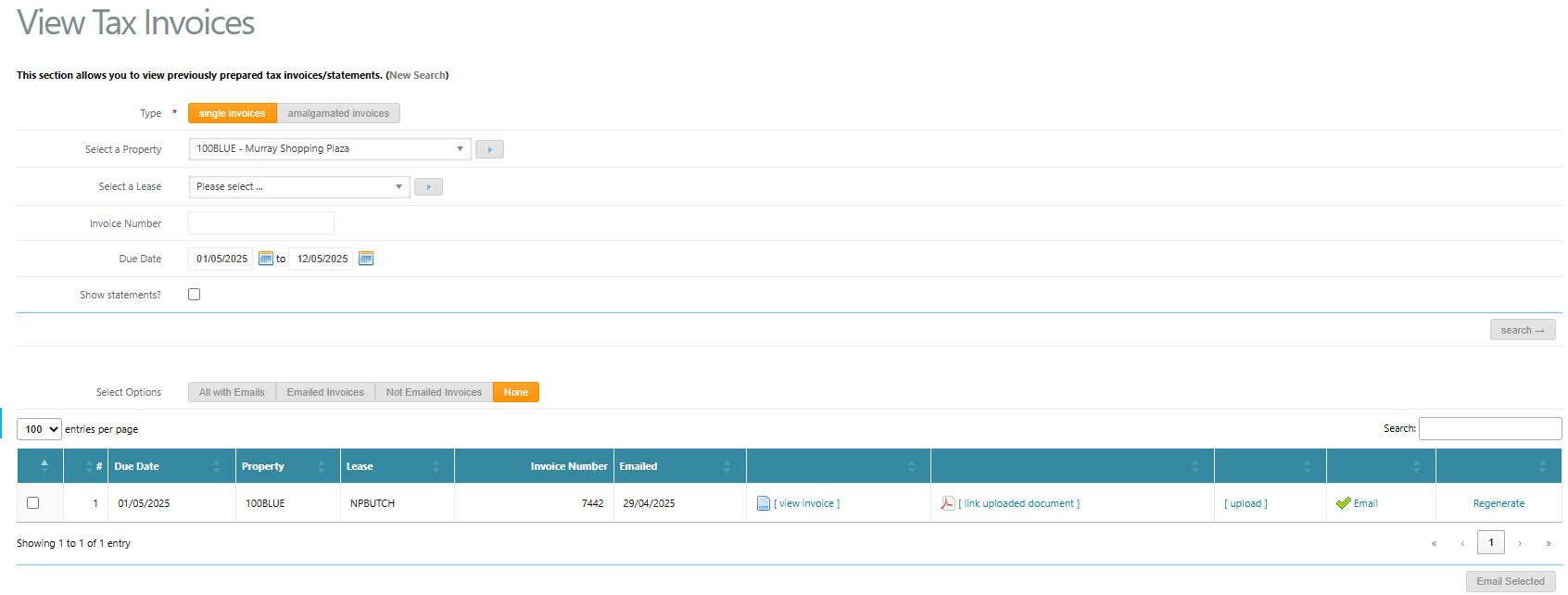
How to View Tax Invoices or Statements
Navigate to View Tax Invoices.
Select a Property and Lease, or enter a specific Invoice Number (if known).
Select a Due Date range.
Tick Show Statements if statements are required.
Click Search.
A list of matching tax invoices and/or statements will display with the following available actions and indicators.
Invoice Actions & Status Indicators
Emailed
Displays the date the invoice was last issued to the tenant. Hover over the date to view the email address the invoice was sent to.View Invoice
Opens a copy of the tax invoice exactly as sent to the tenant.Link Uploaded Document
Allows additional documents to be linked to the invoice. These documents will be sent together with the tenant tax invoice in a single email.Upload
Enables linking of a previously uploaded document. Refer to Link Supporting Documents to Accounts Receivable Invoices for detailed steps.Note:
Supporting supplier invoices will automatically link where:The Accounts Receivable transaction is linked to the Accounts Payable transaction, and
The option to transfer supplier documents from Accounts Payable to Accounts Receivable is enabled.
Email
A green tick indicates the invoice has been emailed.Click Email to resend the invoice if required.
If no tenant email address exists, this will display as
--.Hover over the email icon to view how many times the invoice has been sent.
Regenerate
Regenerates the tax invoice PDF to reflect any changes made via Invoice & Credit Adjustments.
Was this article helpful?
That’s Great!
Thank you for your feedback
Sorry! We couldn't be helpful
Thank you for your feedback
Feedback sent
We appreciate your effort and will try to fix the article